Why Busy Season Downtime Is a Solvable Crisis
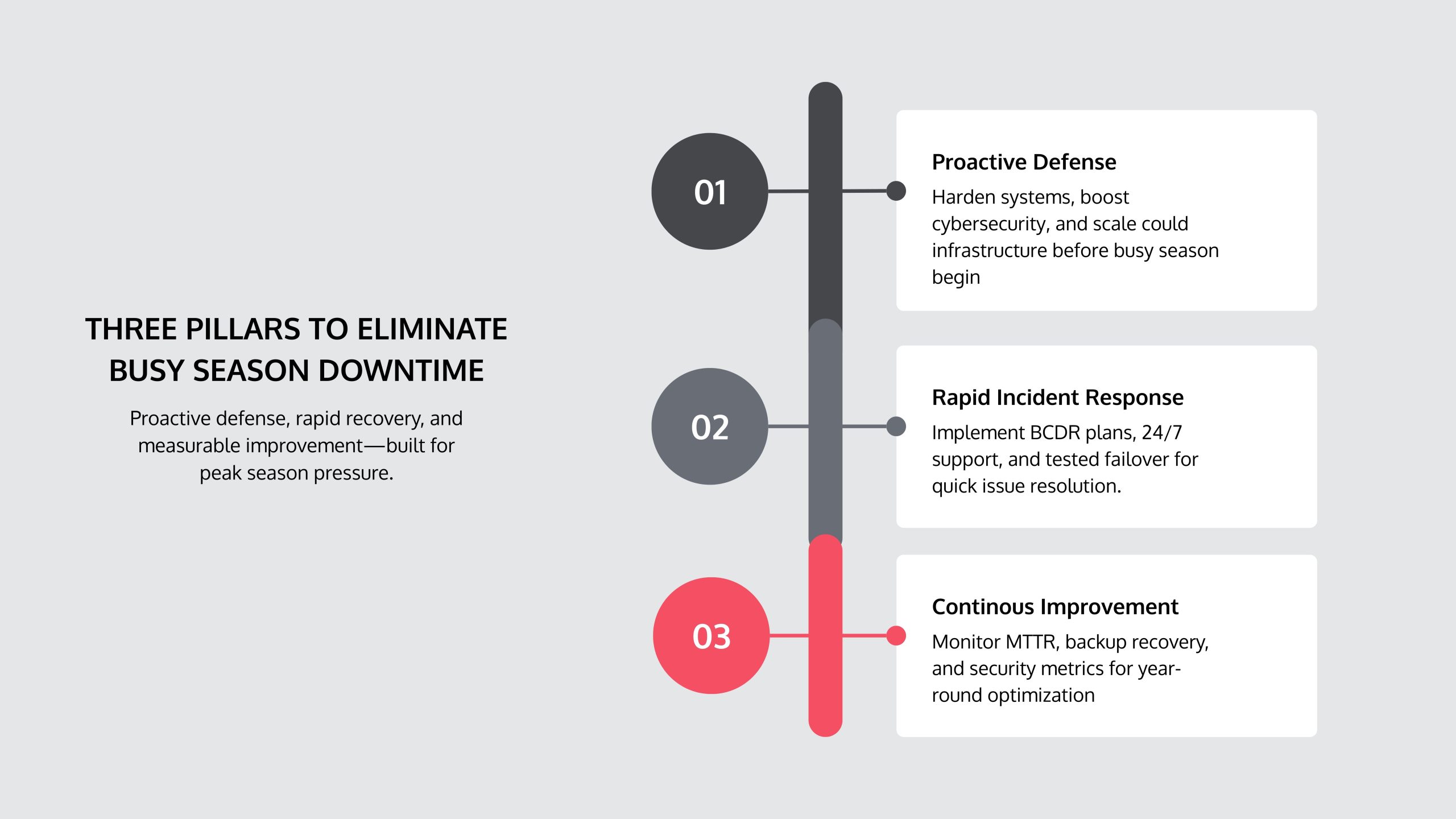
Eliminating IT downtime during busy season for an accounting firm requires three foundations:
- Proactive system hardening before January
- A tested Business Continuity and Disaster Recovery (BCDR) plan with defined Recovery Time Objectives (RTO)
- Year-round monitoring of key IT metrics like Mean Time to Resolution (MTTR)
Firms using these strategies reduce downtime by 60–80% compared to reactive approaches.
During tax season, your team works 63-hour weeks. One hour of downtime costs thousands in lost billable time and missed deadlines, yet most firms rely on reactive IT support that only addresses failures after they occur. The July 2024 CrowdStrike outage, which affected 8.5 million devices, proved that prepared firms with BCDR plans recovered fastest, while others scrambled.
Downtime costs are measurable. For a Houston-area firm with 10 staff at $50/hour, one hour of downtime costs $500 in lost productivity alone, not counting reputational damage.
I’m Orrin Klopper, CEO of Netsurit. For nearly 30 years, I’ve helped accounting firms build resilient IT systems through proactive planning, not reactive firefighting. This guide provides practical steps to fortify your systems, respond to incidents, and track metrics for year-over-year improvement.
Build Your Proactive Defense: Fortifying Systems Before Busy Season
Proactive defense starts months before January. Like preparing for a Houston hurricane, you must fortify IT systems before the busy season hits, not during. This involves system hardening, peak load preparation, and risk reduction.
Harden Your Cybersecurity Posture to Prevent Breaches
Accounting firms are high-value targets for cyberattacks due to the sensitive financial data they hold. A breach can shut down your firm for weeks and destroy client trust.
Start with Multi-Factor Authentication (MFA) on all systems. It requires a second verification step, preventing unauthorized access even with a stolen password.
Next, deploy Endpoint Detection and Response (EDR) to monitor devices for suspicious behavior, catching threats like ransomware before they spread across your Conroe office’s network.
A Security Information and Event Management (SIEM) system aggregates logs from all network devices to detect complex attack patterns that individual systems would miss.
Don’t ignore the human factor. Quarterly phishing simulations train staff in your Katy office to recognize malicious emails, building muscle memory against attacks.
Adhere to compliance mandates like the FTC Safeguards Rule and IRS Publication 4557. For firms needing to demonstrate security controls, SOC 2 compliance provides third-party validation. Encrypt all client data—both at rest and in transit.
Trade-offs of robust cybersecurity:
- Works best when integrated into daily workflows with user-friendly tools and regular training.
- Avoid when implemented as a one-time project without ongoing monitoring.
- Risks: Poorly designed security can slow productivity; too many alerts lead to ignored warnings.
- Mitigations: Balance MFA security with convenience; tune SIEM alerts to reduce false positives; make training practical.
Engineer a Scalable Infrastructure for Peak Loads
Your network must handle peak loads. An infrastructure that supports 15 users in July may fail when they all work simultaneously in March.
Cloud computing provides scalable resources, automatically allocating more processing power during busy season to prevent slowdowns for your Katy firm.
For SaaS optimization, conduct quarterly software license audits to ensure you have enough seats for peak season without overpaying.
Implement Role-Based Access Control (RBAC) to limit user access to necessary data, improving security.
Server performance monitoring helps you track CPU, memory, and disk I/O to identify bottlenecks before they impact operations. When CPU usage on your Conroe file server hits 85%, you know it won’t survive busy season.
Network capacity planning prevents digital traffic jams. Test your Sugarland firm’s network under load and upgrade your ISP plan in December if needed, not February.
Automate Repetitive Tasks to Reduce Human Error
During busy season, overworked staff make more mistakes. Automation reduces this risk by eliminating manual, repetitive tasks.
Workflow automation like automated client onboarding pushes data from digital forms directly into your practice management software.
OCR document capture automatically extracts data from scanned W-2s and receipts, cutting data entry time by up to 80%.
Automated patch management deploys security updates overnight, securing systems without manual intervention.
Automated deadline reminders for clients and staff prevent missed filings.
Four tasks to automate before busy season:
- New client data entry
- Recurring invoice generation
- System security patching
- Data backup verification
Automation makes your infrastructure more reliable by removing human error, allowing your exhausted Houston team to focus on high-value work.
Master Incident Response: How to Eliminate IT Downtime During Busy Season Accounting Firm
Even the best defenses can fail. The difference between a minor hiccup and a crisis is recovery speed. For accounting firms in Houston, Sugarland, Conroe, and Katy, a tested response plan is essential to meet deadlines when an incident occurs.
Develop a Bulletproof Business Continuity and Disaster Recovery (BCDR) Plan
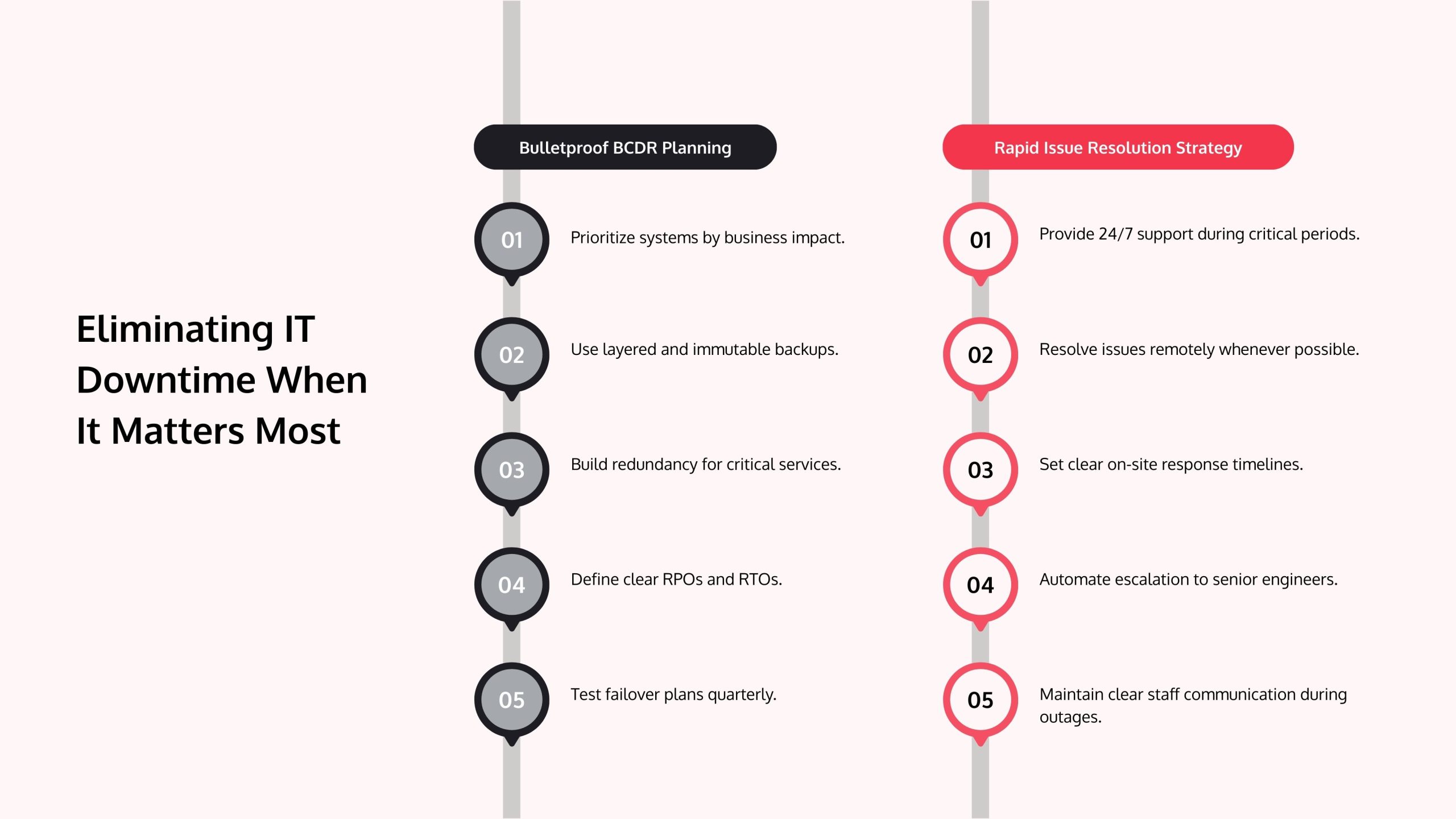
A Business Continuity and Disaster Recovery (BCDR) plan is your playbook for when systems fail. Start by ranking systems by business impact and building recovery strategies accordingly.
Data backups are the foundation. Use a layered approach: local backups for quick file restoration and offsite cloud backups for disaster recovery.
Use immutable backups—copies that cannot be modified or deleted—to protect your data from ransomware that targets backup systems.
Incorporate redundant systems for critical functions, such as dual internet connections from different providers.
Define your Recovery Point Objective (RPO)—how much data you can lose—and Recovery Time Objective (RTO)—how quickly you must restore service. During busy season, your tax software might have an RTO of 30 minutes.
The most critical step is failover testing. Quarterly, simulate disasters to ensure your plan works and staff know their roles. An untested BCDR plan is just documentation. The July 2024 CrowdStrike outage confirmed that firms with tested plans recover significantly faster.
Trade-offs of BCDR Planning:
- Works best when: Reviewed quarterly, tested semi-annually, and updated after major infrastructure changes.
- Avoid when: Treated as a compliance checkbox or left to one person.
- Risks: Outdated plans; untested procedures that fail under pressure; knowledge gaps from staff turnover.
- Mitigations: Document everything in plain language. Run surprise drills. Assign backup roles for critical tasks.
Implement a Strategy for Rapid Issue Resolution
Resolution speed determines an incident’s impact. A 10-minute outage is an inconvenience; a 10-hour outage in March is a crisis.
24/7 support is non-negotiable during tax season. When your software crashes at 9 PM on a Saturday in Sugarland, you need immediate help. At Netsurit, we work critical incidents around the clock.
Remote issue resolution handles 80–90% of incidents faster, with your IT partner using secure tools to diagnose and fix problems in minutes.
Establish on-site support protocols with defined response times for issues requiring a physical presence, like hardware failure in your Conroe office.
Use automated escalation procedures so if a front-line tech can’t solve an issue in 30 minutes, it goes to a senior engineer.
Create Standard Operating Procedures (SOPs) for common issues to ensure consistent troubleshooting.
Finally, maintain a communication plan for outages. Regular updates to staff prevent panic. A database corruption at 7 AM can be a one-hour disruption with good protocols, or a half-day crisis without them.
Measure and Modernize: A Year-Round Strategy for Uptime
Eliminating downtime is a year-round discipline. After April 15, use the post-season to measure performance, fix flaws, and modernize systems for next year. To improve, you must measure.
Track Key Metrics to Drive Continuous Improvement
Track these key IT metrics year-round:
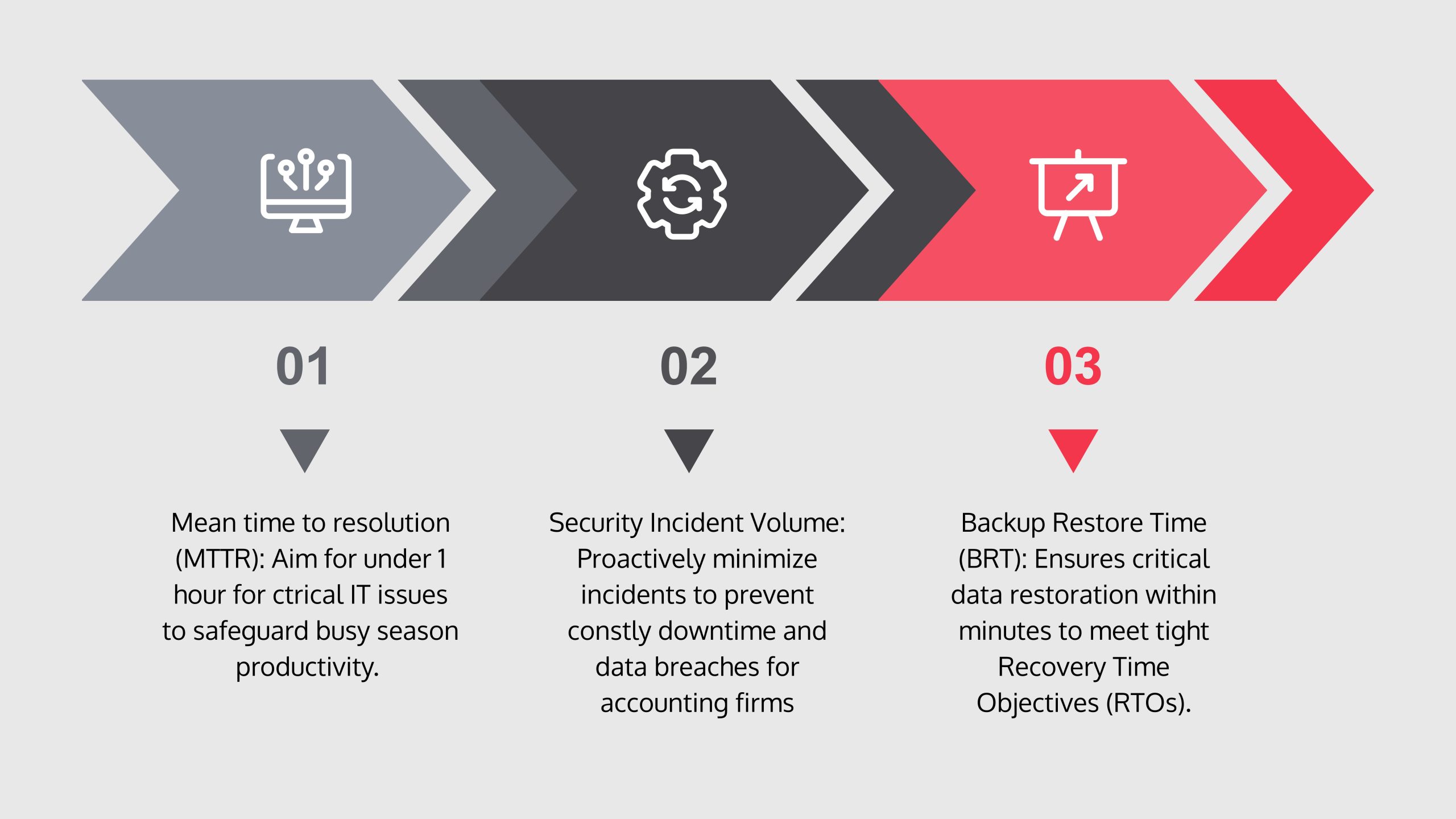
- Mean Time to Resolution (MTTR): The average time to resolve an IT incident. A high MTTR for your Katy firm means costly staff idle time.
- License Utilization Rate: Tracks if you are overpaying for unused software licenses or under-provisioned for peak season.
- Backup Restore Time: How long it takes to restore data from a backup. A Conroe firm learned their restore took 14 hours in practice—far too long. Test this quarterly to ensure it meets your RTO.
- Security Incident Volume: Tracks blocked and successful attacks. A spike during busy season indicates you’re being targeted.
- Endpoint Patch Compliance: The percentage of devices with up-to-date security patches. Aim for 95% or higher.
- User Satisfaction Scores: A simple monthly survey provides early warnings of system sluggishness or poor support.
A Sugarland firm used these metrics to find network slowdowns were caused by a misconfigured router, not insufficient bandwidth, saving them from a costly, unnecessary ISP upgrade.
How to Audit and Modernize Legacy Systems After Busy Season
Use the post-season (May–September) to audit and modernize. Your systems just completed a real-world stress test; use that data.
Start with a strategic IT audit. Review server logs, network data, and support tickets to find recurring issues. Interview your staff in Houston to document user-reported issues and pain points. This qualitative data is invaluable.
Decommission unused hardware and software. These legacy systems create security risks and add maintenance overhead.
Create a modernization roadmap that prioritizes upgrades based on their impact during busy season. For a Katy firm, replacing a file server that caused 12 hours of downtime became the top priority.
Budget for upgrades immediately after tax season. Use audit data to build a business case: “This system caused X hours of downtime, costing $Y. Replacing it costs less than one-third of that loss.”
Frequently Asked Questions about Eliminating IT Downtime
What are the most common, yet overlooked, causes of IT downtime for accounting firms?
- Misconfigured software updates: A faulty update can freeze every workstation. The July 2024 CrowdStrike outage is a prime example. Patches need testing and rollback plans.
- Third-party vendor outages: Your firm is down if your cloud tax software provider is down. Have offline contingencies and vet vendor disaster recovery plans before a crisis hits your Houston firm.
- Human error: Overworked staff in Sugarland make more mistakes, like deleting files or clicking phishing links. Automation and clear procedures mitigate this risk.
- Insufficient network bandwidth: As you move to the cloud, your internet connection is critical. A saturated pipe in your Conroe office can mimic software failure.
Is 100% uptime a realistic goal for my firm?
No. Chasing 100% uptime is impractical and expensive. The goal is service continuity for mission-critical functions, not perfect system uptime.
A realistic target is 99.9% availability, which equals about 8 hours of potential downtime per year.
The key is ensuring that when a component fails, your team can keep working via failover systems. We focus on minimizing the impact of downtime. A robust BCDR plan ensures that even if a server fails, work continues with minimal disruption for your Katy firm.
How do I calculate the true cost of downtime for my firm?
To calculate the true cost of downtime, look beyond lost billable hours. Include staff productivity loss for all employees, potential missed filing penalties, client trust erosion, and long-term reputational damage.
Use this formula as a starting point:
(Number of affected employees × average hourly wage) × hours of downtime + fixed costs
Those fixed costs include emergency IT support fees and any client penalties. For a 20-person Houston firm, a 4-hour outage can easily cost over $7,500, clarifying the ROI on proactive IT investment.
Conclusion: From Surviving to Thriving During Busy Season
Eliminating IT downtime during busy season requires a shift from reactive firefighting to proactive engineering. Firms that thrive—whether in Houston, Sugarland, Conroe, or Katy—treat IT as a strategic partner, investing in cybersecurity, automation, and BCDR to ensure any incident’s impact is measured in minutes, not days.
This means hardening cybersecurity, building scalable cloud infrastructure, automating manual tasks, and implementing a tested BCDR plan. Success also depends on year-round discipline: tracking metrics like MTTR, auditing systems post-season, and modernizing strategically.
Your team should focus on accounting, not worrying if the systems will crash. With the right IT partner, busy season becomes predictable and productive.
If you’re ready to move from surviving to thriving, we can help. Learn how our IT services for accounting firms can help you build a resilient busy season that doesn’t just hold together—but actually supports your growth.