Employees waste time waiting for IT support due to five primary factors: outdated technology, reactive support models, remote work friction, poor training, and a lack of automation. The cost is significant: workers lose an average of 22 minutes daily to IT issues, adding up to 91 hours—more than two work weeks—per year. This translates to an annual waste of $4,072 per employee. For accounting firms in the Houston metro area, where billable hours are paramount, these delays directly erode the bottom line.
The problem extends beyond lost time. When 55% of workers report their company’s tech is antiquated and 1 in 5 cite it as a reason for leaving, you face both a productivity drain and a retention crisis. IT professionals are also burning out—they’re 1.4x more likely to “quiet quit” than other knowledge workers, creating a cycle where support slows as demand grows.
Remote and hybrid models amplify these issues. Remote workers lose more time to tech problems (73%) than on-site employees (22%), reporting over four tech issues weekly. For firms in Sugarland, Katy, and Conroe managing distributed teams during tax season, this gap can mean missing deadlines.
I’m Orrin Klopper, CEO of Netsurit. For 29 years, we’ve helped organizations eliminate IT productivity drains by building proactive managed IT solutions that keep businesses running smoothly, especially for firms where downtime hits revenue and client satisfaction hard.
1. Outdated and Complex Technology Is Your Biggest Bottleneck
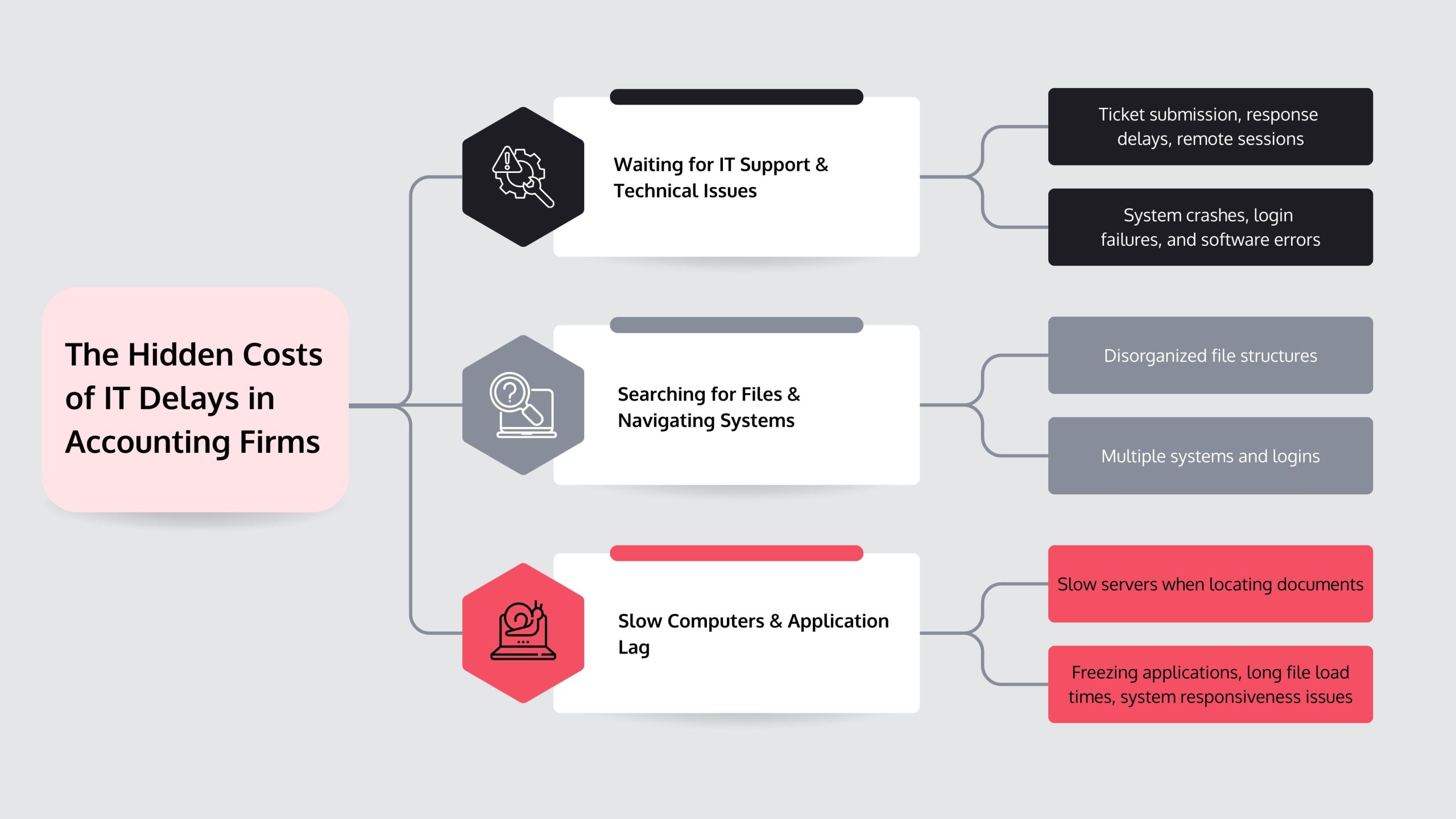
A CPA in Katy, TX, opens a large client file and waits ten minutes for it to load. Their morning momentum is gone, and the schedule is already behind. This is the daily reality for firms running on antiquated technology. When 55% of workers report their company’s tech is outdated, the technology itself is the bottleneck.
The cost is steep. Employees wait an average of 2.5 minutes per hour for computers to respond, which hemorrhages revenue during tax season. Slow software, crashing spreadsheets, and constant login prompts are direct costs, not just inconveniences. Complexity adds to the problem, with IT staff juggling too many platforms (42%) and logins (39%). This chaos trickles down to employees, who waste 23 minutes daily just searching for files.
Consider an accountant in Sugarland needing historical data. The firm’s outdated server and crashing software turn a ten-minute task into a ninety-minute ordeal. The result is a frustrated employee, a delayed deliverable, and a client questioning their choice of firm.
The fix isn’t just faster computers but integrated technology where systems communicate and software handles the workload. When an employee in Conroe uses one unified platform instead of five logins, they start their day working, not troubleshooting. Inefficient technology costs businesses over $4,000 per employee annually, but the real cost is the talented accountant who leaves for a firm with better tools. Upgrading isn’t a luxury; it’s foundational.
2. Your IT Support Model Is Reactive, Not Proactive
When your server crashes, your IT team is likely already juggling other emergencies. This is the reactive “break-fix” model, where every problem is a crisis and prevention is an afterthought. This constant state of emergency burns out IT staff, who are 1.4 times more likely to “quiet quit.” As a result, even critical issues get stuck in a long queue.
This is worsened by tangential problems—side issues that divert focus from the core problem. An employee reports slow email, and IT finds outdated drivers and a full hard drive, consuming time that should be spent on the original ticket. This dynamic severely limits value creation in IT service systems.
Example: A Conroe firm’s server slows during tax season. The swamped IT team takes four hours to respond, costing staff half a day of billable work. A proactive monitoring system would have flagged the server’s degrading performance weeks earlier, allowing for preventative maintenance during off-hours. The problem would have been fixed before anyone noticed.
Proactive IT uses predictive analytics and continuous monitoring to spot warning signs. When a hard drive shows early failure signs, alerts go out and fixes happen before employees lose productivity. This shift allows your IT team to focus on strategic improvements like better security and smoother workflows.
Works best when: You implement automated monitoring, establish clear escalation procedures, and schedule maintenance outside peak hours.
Avoid when: Your IT infrastructure is too fragmented to monitor, or you lack the expertise to interpret the data.
Risks: Initial setup costs and the learning curve for new tools.
Mitigations: Partner with a managed IT service provider that has proactive systems in place, turning prevention into a service.
3. Why Do Employees Waste Time Waiting for IT Support? The Remote Work Challenge
Remote and hybrid work models have complicated IT support. A problem that once took five minutes to fix at a desk now requires a formal ticket, a remote session, and hours of waiting. This is a major reason employees waste time waiting for support.
The numbers show a clear gap: 73% of remote workers report losing productive hours to tech issues, compared to just 22% of on-site employees. Remote staff face over four tech problems per week, each one eating into billable hours. The causes include unreliable home internet, personal devices used for business (81% of workers), and the lack of physical IT presence. Even IT professionals struggle, with 31% citing difficulties connecting from remote locations.
Example: A remote bookkeeper in Houston can’t access the firm’s secure server. Without an IT person to physically check the connection, they submit a ticket and wait two hours for a remote session. This delay costs a quarter of their billable hours for the day, directly impacting client service and revenue.
The Trade-offs of DIY Fixes
When support is slow, employees often try to fix problems themselves. This can be a double-edged sword.
- Works best when: The issue is simple and well-documented, like restarting a router or clearing a browser cache.
- Avoid when: The problem involves server access, data security, or core business software. A wrong click can corrupt client data or create security gaps.
- Risks: You might waste more time than just waiting, cause bigger problems, or create security vulnerabilities by changing settings you don’t understand.
- Mitigations: Provide a clear guide on which troubleshooting steps are safe. Implement self-service portals with automated fixes for common issues like password resets and basic connectivity checks. This empowers employees while protecting the firm from serious mistakes.
4. A Lack of Employee Training Creates Unnecessary Dependence
When employees aren’t trained on their daily tools, every minor hiccup becomes a support ticket. This knowledge gap is a key reason employees wait for IT support. With one in five workers reporting their employer provides no training, they are forced to either struggle alone or call IT for simple tasks. On average, employees spend 3 hours per week on issues that proper training could have prevented, such as password resets and file management.
Why employee tenure impacts time spent waiting for IT support
The experience gap is stark. New employees—at a company for less than five years—spend up to 15 hours per week troubleshooting. They lack institutional knowledge and familiarity with the firm’s specific system configurations.
Tenured employees tell a different story, spending only about one hour per week troubleshooting. Their familiarity with systems and informal networks allows them to resolve issues much faster. They have built practical knowledge that newer employees lack.
Example: A junior accountant in Houston repeatedly gets locked out of their account. Unaware of the firm’s self-service password reset tool, they submit a ticket every time. A 10-minute training session during onboarding covering this tool could have prevented the recurring issue, freeing up both the accountant and IT for client work. Research shows that problem-solving consumes significant employee time that targeted training can reclaim.
The solution is straightforward: invest in structured onboarding that covers your firm’s IT environment, create simple documentation for common issues, and ensure employees know what self-service tools are available. This upfront time investment pays dividends when your newest hire can reset their own password instead of waiting for a ticket response during tax season.
5. How AI and Automation Are Slashing IT Wait Times
The shift from reactive to predictive IT support, driven by AI and automation, is fundamentally changing how support works. These tools spot and fix issues before employees are affected. A server showing strain is flagged for off-hours maintenance; a software license about to expire is automatically renewed. This proactive approach handles the routine work that buries IT teams, freeing human experts for complex projects like cloud migrations.
For accounting firms, this means fewer disruptions. AI-powered systems offer proactive issue detection by monitoring device health to predict failures. Automated ticket routing analyzes problems and instantly sends them to the correct specialist. Smarter self-service portals and AI-powered knowledge bases give employees personalized, accurate answers quickly. Finally, virtual support agents handle routine requests 24/7, resolving issues like password resets and printer troubleshooting instantly.
Example: An accounting firm in Sugarland, TX, uses an AI chatbot for IT support. When a printer driver fails, the chatbot diagnoses the issue and walks the employee through a 2-minute automated re-installation. This resolves a problem that previously required a 45-minute wait for a technician. The employee loses two minutes instead of an hour, and IT is never involved. This shows how AI is redefining IT service desk automation in practical, measurable ways.
The difference is stark. Traditional support relies on human availability; AI-powered support provides instant, automated resolution for the 60-70% of help desk tickets that are routine.
| Metric | Traditional IT Support | AI-Powered IT Support |
| Average Response Time | Hours to days, depending on queue | Seconds to minutes for routine issues; faster routing for complex problems |
| Resolution of Common Issues | Manual human intervention, often requiring a ticket and wait | Instant via virtual agent or self-service; automated fixes |
| Proactivity | Largely reactive, addressing issues after they occur | Proactive detection and prevention of issues before they impact users |
| Employee Experience | Frustration, lost productivity, reliance on human availability | Empowerment through instant self-service, quicker resolution, reduced downtime |
AI works best when you have a high volume of repetitive support requests. Avoid over-relying on AI when dealing with highly specialized systems or sensitive situations requiring human judgment. The main risk is poor implementation, creating a frustrating bot that can’t help. Mitigate this by starting with a well-defined scope (like password resets), training the AI on your specific environment, and always providing a clear path to human support.
Frequently Asked Questions about IT Support Delays
How much productivity is lost to IT issues?
Employees lose nearly 3 hours weekly to tech issues, totaling over 91 hours annually. This is more than two full work weeks spent on system glitches instead of client work. For an accounting firm in the Houston metro area, this translates to over $4,072 per employee each year in wasted labor costs. During tax season, these delays compound, risking missed filings and damaging client relationships.
Does better technology really improve employee morale?
Yes. Inadequate technology is a significant retention risk. Research shows that 1 in 5 employees who changed jobs in the past year cited poor technology as a contributing factor. When staff spend more time fighting outdated software than doing their jobs, it signals that their time isn’t valued. For firms competing for talent in Sugarland, Katy, and Conroe, quality technology can be the difference between keeping top CPAs and losing them.
Is it a good idea to let employees fix their own IT problems?
It depends on the problem. For basic issues like restarting a router or clearing a browser cache, empowering employees with self-service tools saves time. A good self-service portal can resolve a password reset in minutes. However, encouraging DIY fixes for anything involving server access, data security, or core business software is risky. An accidental misconfiguration can cause data breaches or system outages that take days to fix. The best approach is to provide robust self-service tools for low-risk problems and clear guidelines on when to stop and call IT.
Conclusion: Stop Wasting Time and Start Optimizing Your IT
Employees waste time waiting for IT support because of outdated systems, reactive support, remote work complexity, poor training, and a lack of automation. For accounting firms in the Houston metro area, these are not abstract problems—they are lost billable hours and missed deadlines.
The financial impact is concrete: at $4,072 per employee annually in wasted labor, a 20-person firm loses over $80,000 each year to IT delays. This is a business problem that erodes profitability.
The good news is that every root cause is addressable. Modern systems eliminate bottlenecks, proactive monitoring prevents outages, and AI-powered automation handles routine requests instantly. For firms in Sugarland, Katy, and Conroe, these changes turn technology from a daily frustration into a reliable foundation for growth. This shift is about reclaiming those 91 hours per employee and redirecting them toward client service and revenue-generating work.
At Netsurit, we help organizations eliminate these productivity drains. Our managed IT services for accounting firms combine proactive monitoring, AI-driven automation, and expert support to ensure your technology works for you, not against you.
Learn how our managed IT services for accounting firms can eliminate downtime and start reclaiming those lost hours today.