Why Manual Data Entry Is Costing Your Firm More Than You Think
AI tools to reduce manual data entry in accounting firm workflows are no longer optional—they’re essential for staying competitive. If your team is buried in invoices, receipts, and reconciliations, you’re losing time, money, and accuracy.
Quick answer: Top AI tools for reducing manual data entry in accounting firms include:
- AP/AR automation platforms (e.g., Vic.ai, BILL) – automate invoice processing, GL coding, and payment workflows.
- Expense management tools (e.g., Dext, AppZen) – capture receipts, enforce policy, and flag anomalies.
- Bookkeeping automation (e.g., Botkeeper, Zeni) – handle transaction categorization and reconciliation.
- Compliance tools (e.g., Trullion) – extract contract data and automate journal entries for standards like ASC 842.
These tools use OCR, machine learning, and NLP to eliminate repetitive data entry, cutting processing times by up to 40% and reducing errors by 30%.
The problem isn’t just the volume of invoices and receipts; it’s the opportunity cost. When your team spends hours on data entry, they can’t focus on higher-value work like financial analysis, strategic planning, or client advisory services. With 86% of accounting teams still entering data manually, this bottleneck is draining productivity and profit.
AI changes the equation. It automates tedious work—extracting data, categorizing transactions, flagging errors—so your staff can shift from record-keeping to strategy. Firms using AI grow revenues three times faster than those that don’t.
I’m Orrin Klopper, CEO and co-founder of Netsurit. For nearly 30 years, I’ve helped hundreds of organizations modernize their IT and operations. We’ve seen accounting firms transition to AI tools to reduce manual data entry in accounting firm workflows and achieve faster closes, fewer errors, and more billable hours.

Manual Data Entry: The Bottleneck Holding Firms Back
Your accounting team is drowning in data entry, and it’s costing you more than just billable hours. Every invoice, receipt, and bank statement represents manual work that consumes a significant chunk of your team’s week.
The real cost is opportunity. While your staff keys in data, they aren’t analyzing cash flow, advising on tax strategy, or building client relationships. They’re stuck in reactive mode, chasing paperwork instead of delivering the high-value work that sets your firm apart.
Manual entry also introduces risk. A transposed digit or a misclassified expense can compound into reconciliation headaches and compliance issues. The global market for AI in accounting is projected to reach £29.33 billion by 2030, driven by firms desperate to escape this bottleneck.
AI tools to reduce manual data entry in accounting firm operations target these repetitive tasks. Using Optical Character Recognition (OCR), Natural Language Processing (NLP), and machine learning, AI can automate invoice processing, expense categorization, and bank reconciliation with greater speed and accuracy than a human.
In practice, an AI tool can receive a PDF invoice, extract all relevant data, code the expense, and route it for approval without a human touching a keyboard. Your staff only needs to review flagged exceptions before moving on to advisory work. This shift frees your team to interpret data, advise clients, and build strategy. For more on how AI transforms workflows, explore our AI Productivity solutions.
Firms that automate these tasks are closing books faster and serving more clients with the same headcount. Those still relying on manual processes are falling behind, not due to a lack of skill, but because their processes can’t scale.
Target the Right Tasks: Where AI Delivers the Most Value
Not every accounting task is a good fit for automation. The sweet spot is repetitive, rules-based work involving structured or semi-structured data. This is where AI tools to reduce manual data entry in accounting firm workflows deliver the most value.
Three core technologies power this automation:
- Optical Character Recognition (OCR) reads text from scanned documents and images. What OCR is
- Natural Language Processing (NLP) understands the context and meaning in contracts and invoices. NLP overview
- Machine learning learns from your historical data to improve categorization and anomaly detection over time. Machine learning basics
Together, these technologies eliminate tedious manual work, freeing your staff for analysis and client strategy. The most common automation targets include:
- Invoice processing: AI extracts data from any format, codes it to the correct GL account, and can make processing 80% faster with 99% accuracy.
- Expense report entry: Employees snap a photo of a receipt, and AI extracts the details, categorizes the expense, and flags policy violations.
- Bank reconciliation: AI automatically matches bank statement lines to ledger entries, surfacing only exceptions for human review.
- Transaction categorization: Machine learning studies past decisions to apply them consistently to new transactions.
Our expertise in AI Productivity helps teams identify which tasks will deliver the fastest return.
Example: An AI tool extracts vendor, date, and amounts from a PDF invoice, codes the expense to the correct general ledger account, and routes it for approval—no manual typing required.
Trade-offs:
- Works best when: You process high volumes of standardized documents (invoices, receipts).
- Avoid when: Documents are highly unstructured or require unique human judgment.
- Risks: Poor historical data can train the AI incorrectly.
- Mitigations: Start with a data cleanup and pilot on one or two high-volume, standardized workflows.
Quantify the Impact: What AI Automation Means for Your Firm
Adopting AI tools to reduce manual data entry in accounting firm operations delivers tangible, measurable benefits beyond just speed.
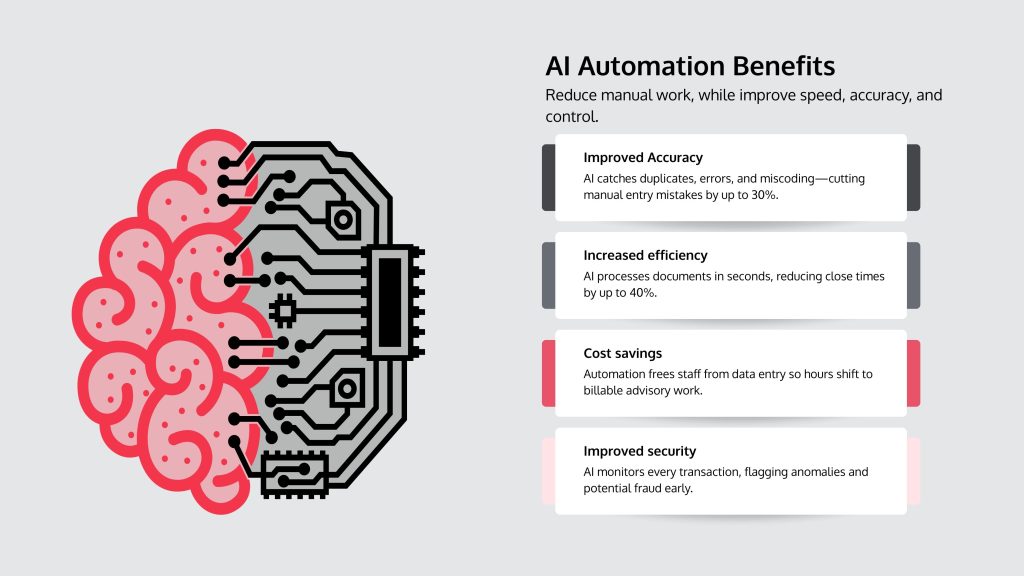
- Improved accuracy: AI doesn’t get tired. Automation reduces manual entry errors by 30% by catching duplicate invoices, incorrect amounts, and coding mistakes before they cause problems.
- Increased efficiency: AI processes documents in seconds, not hours. It can cut processing times by up to 40%, leading to faster month-end closes and more capacity to take on new clients without hiring.
- Cost savings: When AI handles repetitive data entry, you can reallocate those hours to billable advisory work instead of paying for manual reconciliation.
- Improved security: AI monitors every transaction, flagging unusual patterns or potential fraud that a human reviewer might miss.
The biggest shift is strategic focus. Your accountants become financial advisors who analyze trends and guide client decisions. This is what drives real growth, with AI-adopting firms seeing revenues grow three times faster than those that don’t.
By the numbers: AI tools can reduce manual entry errors by 30% and cut processing times by 40% (per 2023 industry studies), freeing up billable hours for advisory work.
ROI calculation: Track the weekly hours your team spends on a manual task like invoice processing. Multiply those hours by the average hourly wage. If your team spends 20 hours per week at $25/hour ($26,000 annually) and AI automates 80% of that work, you save $20,800 per year. Payback often comes within months.
Our Digital Finance Transformation services help your firm capture these benefits with minimal disruption.
Build Your AI Toolkit: Categories and Features That Matter
Instead of chasing brands, focus on tool categories and features that solve your firm’s specific data entry problems. The right AI tools to reduce manual data entry in accounting firm operations are those that align with your workflows.

Start by identifying which category of tool addresses your biggest pain point:
- AP/AR automation for end-to-end invoice and payment processing.
- Expense management to capture, categorize, and approve employee expenses automatically.
- Compliance automation for complex standards like lease accounting or revenue recognition.
The best tools integrate seamlessly with your existing accounting software, ERP, and CRM systems. A standalone solution that creates more data silos defeats the purpose. Security is equally critical; any tool handling financial data needs robust encryption, access controls, and audit trails. Our IT Audits and Assessments can help you evaluate a tool’s security before you commit.
Accounts Payable (AP) and Receivable (AR) Automation: What to Look For
These tools transform a multi-day, error-prone process into same-day automation. Key features include:
- Automated data extraction: Uses OCR and NLP to pull data from any format with up to 99% accuracy.
- Three-way matching: Automatically compares invoices against purchase orders and goods receipts to prevent overpayments.
- Approval workflow automation: Routes invoices based on predefined rules (e.g., amount, department).
- Payment integration: Connects to your banking systems to automate payments once approved.
- AI-powered fraud detection: Monitors for duplicate invoices, unusual payment amounts, or suspicious vendor changes.
Example: A platform learns your GL coding from past data and flags only outliers for review. Your team focuses on the 1% of exceptions, not the 99% of routine invoices.
Expense Management and Receipt Tracking: Key Features
AI tools transform expense management by enforcing policies and automating entry from the moment a purchase occurs. Look for:
- Mobile receipt capture: Employees snap a photo, and AI extracts all relevant data.
- Real-time policy checks: The AI instantly flags out-of-policy spending like over-budget meals or non-approved vendors.
- Automated categorization: Machine learning assigns expenses to the correct GL accounts and cost centers.
- Corporate card reconciliation: Automatically matches card transactions to submitted receipts.
Example: Employees use a mobile app to snap receipts. The AI audits 100% of reports in real time, so your team only reviews exceptions. This can cut processing time by 80%.
Compliance Automation for Complex Standards
For firms dealing with regulations like ASC 842 (Lease Accounting) or IFRS 16, specialized AI is invaluable. This work is time-consuming and error-prone when done manually.
- Contract analysis: NLP reads legal documents and extracts key terms like payment schedules and renewal options.
- Automated journal entries: The tool generates all required accounting entries based on the extracted contract data.
- Disclosure reporting: Automatically compiles data needed for financial statement disclosures.
- Audit trail: Maintains a complete record of all data processing for transparency.
Example: AI reads hundreds of lease agreements, extracts payment schedules, and generates the required accounting entries, reducing manual review from hours to minutes per contract.
Implement AI with Minimal Disruption: A Step-by-Step Roadmap
Success with AI tools to reduce manual data entry in accounting firm operations depends on process, people, and planning—not just technology. A thoughtful approach ensures a smooth transition and maximizes benefits.
Firms that succeed with AI start by understanding their workflows, cleaning their data, and preparing their teams. This groundwork is the difference between a tool that transforms operations and one that sits unused. A structured implementation involves mapping processes, assessing data quality, training staff, managing change, and setting security protocols. Our How to Create a Business IT Strategy services can help you plan for these shifts effectively.
Find the Best Automation Candidates in Your Workflow
Before buying software, analyze your processes to find where AI will have the most impact.
- Map workflows: Document each step of your data entry processes to find redundancies and bottlenecks.
- Track time spent: Use data, not assumptions, to see which tasks consume the most hours.
- Prioritize: Use a matrix to weigh a task’s impact on efficiency, its frequency, and its error rate. High-volume, standardized tasks with frequent errors are the best pilot candidates.
A Productivity Assessment can pinpoint these opportunities.
Action step: Have staff log time spent on data entry for one week. The most time-consuming task is your best pilot candidate.
Address Common Implementation Challenges
Anticipating obstacles turns problems into planning exercises.
- Data silos: Inconsistent data across different systems will cripple an AI tool. Consolidate and clean your data first.
- Team resistance: Staff may worry about job loss. Frame AI as a tool that removes tedious work, not people, freeing them for more valuable advisory tasks. Involve them in tool selection to build buy-in.
- Integration complexity: Your new AI tool must connect with your existing software. Look for tools with robust APIs and proven integration capabilities.
- Security concerns: Financial data requires non-negotiable security. Ensure any tool has strong security features and helps you maintain compliance. Our Cyber Security expertise ensures your implementation adheres to the highest standards.
Works best when: You start with a single, high-volume workflow pilot, involve staff in planning, and allocate time for data cleanup before deployment.
Avoid when: Your data quality is poor, your team hasn’t been consulted, or you’re trying to automate every process at once.
Risks: Poorly integrated tools create more work; inadequate training leads to underutilization; security gaps expose client data.
Mitigations: Choose tools with strong integration support, invest in staff training, and conduct security audits.
How AI Changes the Role of Your Accounting Staff
AI lifts, not replaces, accountants. It excels at processing data but cannot build trust, interpret nuance, or make complex judgment calls. AI transforms the accountant’s role into something more strategic:
- Data analysts who interpret what numbers mean for clients.
- Exception handlers who apply human judgment to the 1% of transactions AI flags as unusual.
- Strategic advisors who use real-time insights for financial planning and risk management.
This shift from reactive bookkeeping to proactive advising is fundamental for modern accounting firms. Learn more with our AI Tools for Accounting & Tax Webinar.
Example: An accountant who once spent 15 hours a week on invoice entry now spends that time identifying cost-saving opportunities for clients—work that strengthens relationships and justifies higher fees.
Synthesis and Next Steps: Move from Data Entry to Data Strategy
AI tools to reduce manual data entry in accounting firm operations are now essential for staying competitive. The question is no longer whether to adopt AI, but how.
The payoff is measurable: firms see up to 30% fewer errors and 40% faster processing. But the real advantage is strategic. Your team shifts from data entry to client advisory, analyzing trends and spotting opportunities. This is what separates growing firms from stagnant ones.
To start, focus on your process, not a product.
- Assess your workflow. Track where your team’s time goes for one week to find the biggest data entry bottleneck. That’s your pilot project.
- Prioritize data quality. AI learns from your historical records. Clean data is the foundation for successful automation.
- Ensure security. Choose tools with robust encryption and access controls. Our Cyber Security services can ensure your implementation meets industry standards.
At Netsurit, we help accounting firms assess workflows, select the right tools, and manage implementation. We know success comes from a solid plan that puts your people and processes first.
Ready to move from data entry to data strategy? Explore our Accounting Firm IT Services to see how we can help.