Stop Chasing Variances: Streamline Your Close with AI Automated Bank Reconciliation
Implementing AI automated bank reconciliation is the fastest way to turn your exhausting month-end close into a continuous, daily confirmation. Instead of wasting hours manually matching bank statement lines to general ledger (G/L) entries in spreadsheets, modern systems use machine learning to reconcile transactions on the day they land.
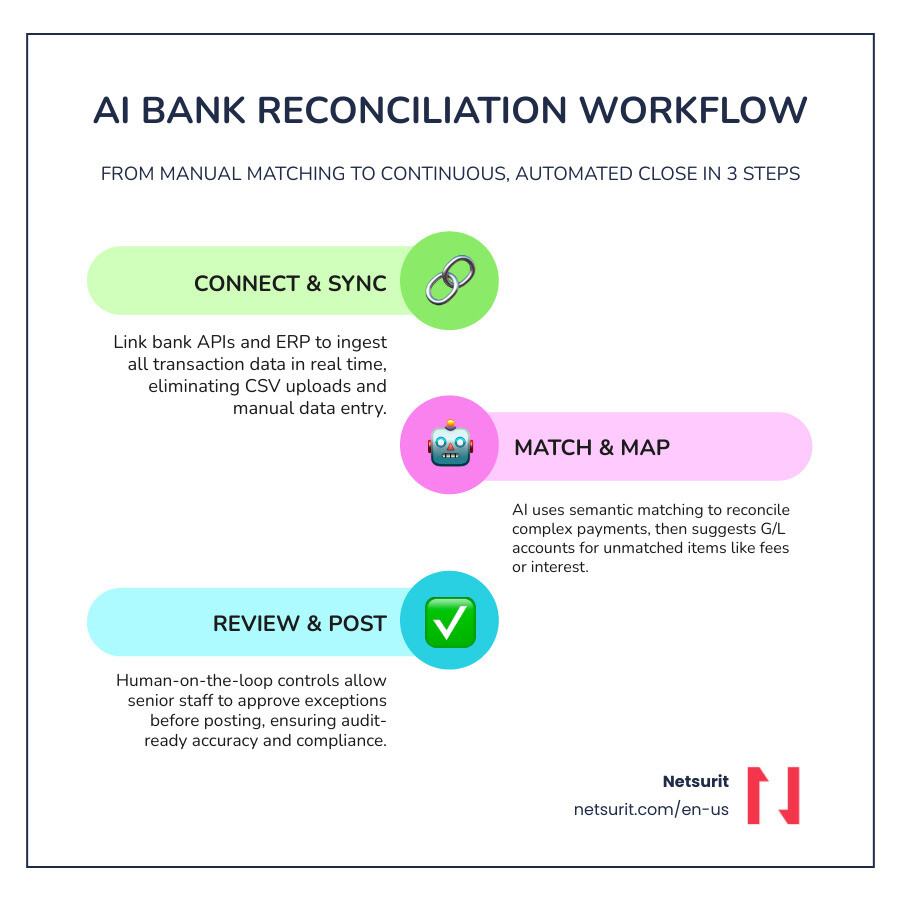
How to Automate Bank Reconciliation in 5 Steps
- Step 1: Link Bank APIs — Connect your bank feeds directly to your accounting platform to replace manual CSV uploads.
- Step 2: Sync Your ERP — Integrate platforms like NetSuite or Microsoft Dynamics 365 to establish a single source of truth.
- Step 3: Run AI Semantic Matching — Let machine learning match complex transactions, like lump-sum payments covering multiple invoices.
- Step 4: Map Unmatched Transactions — Use AI to suggest the correct G/L accounts for unexpected bank fees or interest.
- Step 5: Enforce Human Review — Maintain strict control by having senior staff review and approve exceptions before posting.
Manual reconciliation is a major operational bottleneck. In July 2026, half of all mid-market finance teams still require six or more business days to close their books. This delay happens because traditional, rule-based software breaks down when it encounters minor date differences, missing transaction numbers, or aggregated payment gateway deposits.
Whether you manage a rapidly expanding service business in Sugar Land or a high-volume tax practice in Houston, Texas, these manual delays hurt your cash visibility. When your cash position is a backward-looking snapshot, making real-time business decisions becomes nearly impossible. Worse, manual reconciliation is prone to error rates as high as 45%, leaving your firm exposed to undetected fraud and audit failures.
However, moving to an autonomous model is not a simple “set-and-forget” project. AI systems require structured data, clean integration pathways, and a solid IT infrastructure to operate safely. If your underlying network is unstable or your ERP is poorly configured, automating the process will only accelerate your accounting errors.
I am Orrin Klopper, CEO and co-founder of Netsurit, where I have spent more than 30 years helping organizations modernize their IT infrastructure to successfully deploy tools like AI automated bank reconciliation. My team and I specialize in keeping your financial systems secure, connected, and completely optimized for the future of automated accounting.
Easy AI automated bank reconciliation glossary:
- Automate reconciliation processes
- AI for financial statements
- Machine learning accounting
Overcoming the Limits of Legacy Spreadsheet Reconciliation
Traditional bank reconciliation relies on batch processing. Accountants extract transactional data from banking portals and ERP ledgers, dump the records into Excel, and write complex VLOOKUP formulas to find matches. This manual routine consumes up to 65% of a finance professional’s time, leaving little room for high-value analysis or strategic forecasting.
When you rely on spreadsheets, you delay your cash visibility. A transaction that clears on the second day of the month might not be reconciled until the tenth day of the following month. For a construction firm in Conroe managing multiple active job sites, or a medical practice in Katy processing thousands of insurance co-pays, this lag hides critical cash flow realities. You cannot confidently fund payroll or purchase inventory when your ledger is weeks behind your actual bank balance.
Furthermore, manual matching permits offsetting errors to slide through unnoticed. For example, if two separate vendor payments of $1,500 clear on the same day, a manual accountant might match them to the wrong purchase orders. The aggregate cash balance remains correct, but your subledgers become corrupted. This error remains hidden until a vendor flags an unpaid invoice, forcing your senior staff to waste hours auditing historical spreadsheets.
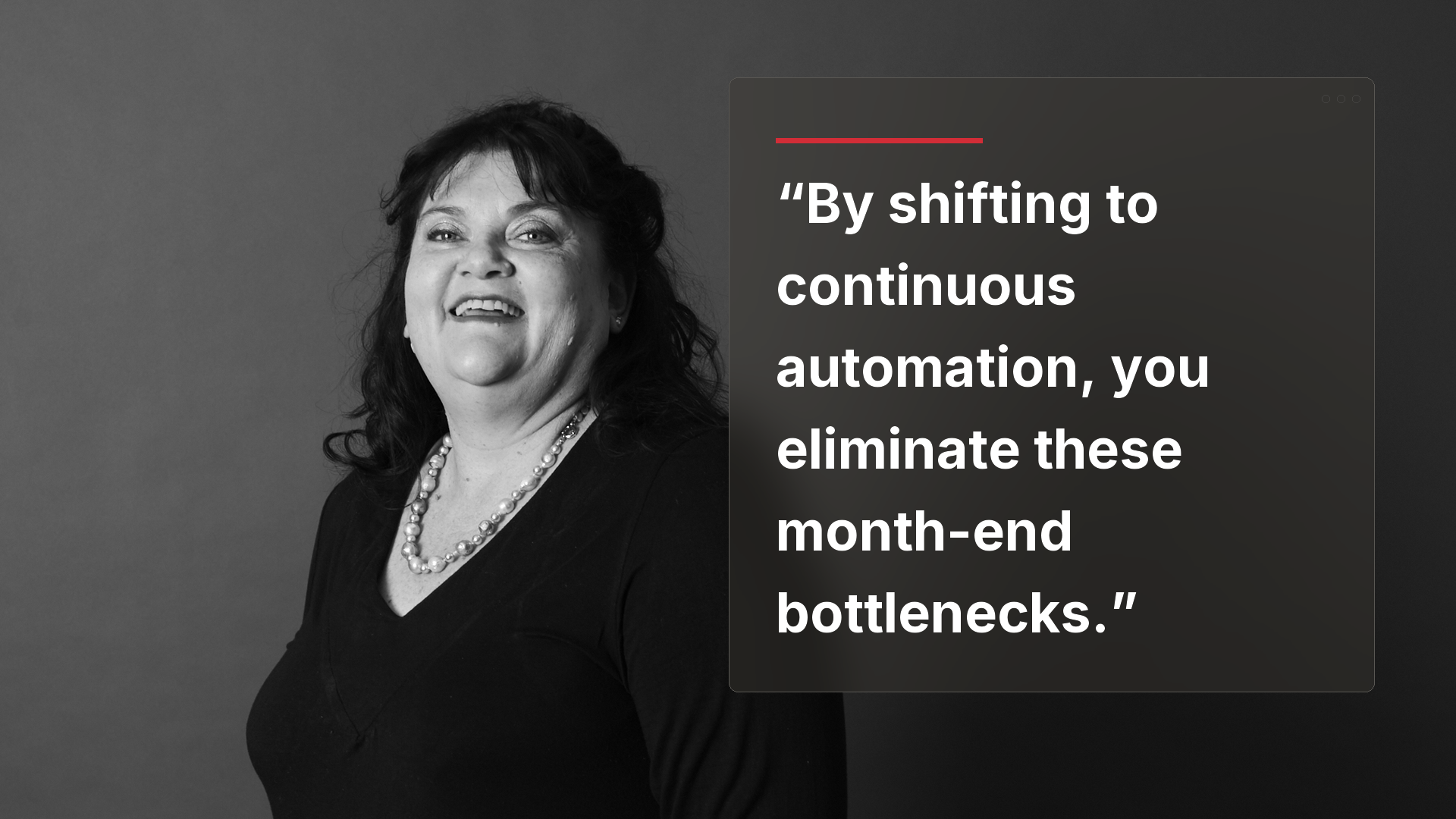
By shifting to continuous automation, you eliminate these month-end bottlenecks. The system verifies transactions in real time, turning the financial close into a daily, low-effort confirmation.
The Technical Framework Behind Intelligent Transaction Matching
Modern software moves beyond the rigid, rule-based “if-then” logic of older systems. Traditional matching engines fail when a bank description says “AMZN MKTP” but the internal purchase order reads “Amazon Marketplace.” Legacy platforms flag this as an exception, requiring human intervention.
AI-native financial tools leverage machine learning and Natural Language Processing (NLP) to perform semantic matching. The algorithm analyzes historical data patterns to understand context. It recognizes that “AMZN MKTP” and “Amazon Marketplace” represent the same entity with over 95% confidence. It also tracks timing delays, learning that credit card settlements from specific payment gateways consistently post with a two-day lag, automatically adjusting its matching parameters.
This intelligence also strengthens your internal fraud detection and regulatory compliance. Rather than waiting for a post-payment audit, the AI monitors transactions continuously. It immediately flags pattern anomalies, such as an unusual sequence of high-value wire transfers to an unverified account or duplicate payments with minor spelling variations.
To understand how to prepare your business for this shift, read the ultimate guide to AI native accounting software and explore Automated Reconciliation Software | AI Transaction Matching and Bank Reconciliation | Nanonets.
Trade-offs of AI-Driven Reconciliation
| Aspect | Details |
|---|---|
| Works best when… | You process high volumes of standardized transactions across multiple bank accounts and modern ERP systems with clean data inputs. |
| Avoid when… | Your accounting relies on highly irregular, custom-negotiated payment terms that lack any structured digital documentation. |
| Risks | Over-reliance on AI suggestions can lead to incorrect ledger entries if users blindly approve low-confidence matches. |
| Mitigations | Enforce strict confidence-score thresholds and require dual-authorization for any transactions flagged below an 85% match rate. |
A Step-by-Step Playbook to Transition Your Accounting Workflows
Transitioning to an automated model requires structured execution. For a CPA firm in Sugar Land or a retail business in Katy, a chaotic implementation will disrupt cash flows and corrupt financial reporting. Follow this five-step playbook to ensure a secure, highly accurate transition.
Step 1: Centralize Bank Feeds and Ingest Transaction Data
To build an automated workflow, you must eliminate manual statement downloads. Instead, establish direct, read-only API connections to your banking institutions. This ensures that transaction data flows securely and continuously into your matching engine without human intervention.
Modern tools ingest native structured formats like MT940 or CAMT.053 files, as well as unstructured formats like PDF statements and transaction confirmation emails. By centralizing these feeds, you secure a real-time view of your global cash position across all operating accounts and digital payment gateways. To explore how to centralize these flows, check out the Account Reconciliation Automation Platform | Embat.
Step 2: Connect Your ERP and Configure Operational Limits for AI Automated Bank Reconciliation
Next, establish a bidirectional sync between your reconciliation software and your core ERP, such as NetSuite or Microsoft Dynamics 365 Business Central. This bidirectional connection allows the matching engine to read open invoices and write back matched ledger entries automatically.
During this step, you must configure the operational limits of your ERP. For example, older versions of Microsoft Business Central limit open bank ledger entries to approximately 1,000 lines per reconciliation run, whereas newer updates expand this threshold to 3,000 lines. Ensuring your IT infrastructure is optimized for these data migrations prevents system crashes during high-volume periods. For detailed migration steps, read the ultimate guide to AI financial data migration.
Step 3: Deploy Machine Learning for Semantic Transaction Matching
With your data streams connected, deploy your machine learning engine to begin matching transactions. The software utilizes fuzzy matching algorithms and historical pattern recognition to link bank statement lines to your internal G/L records.
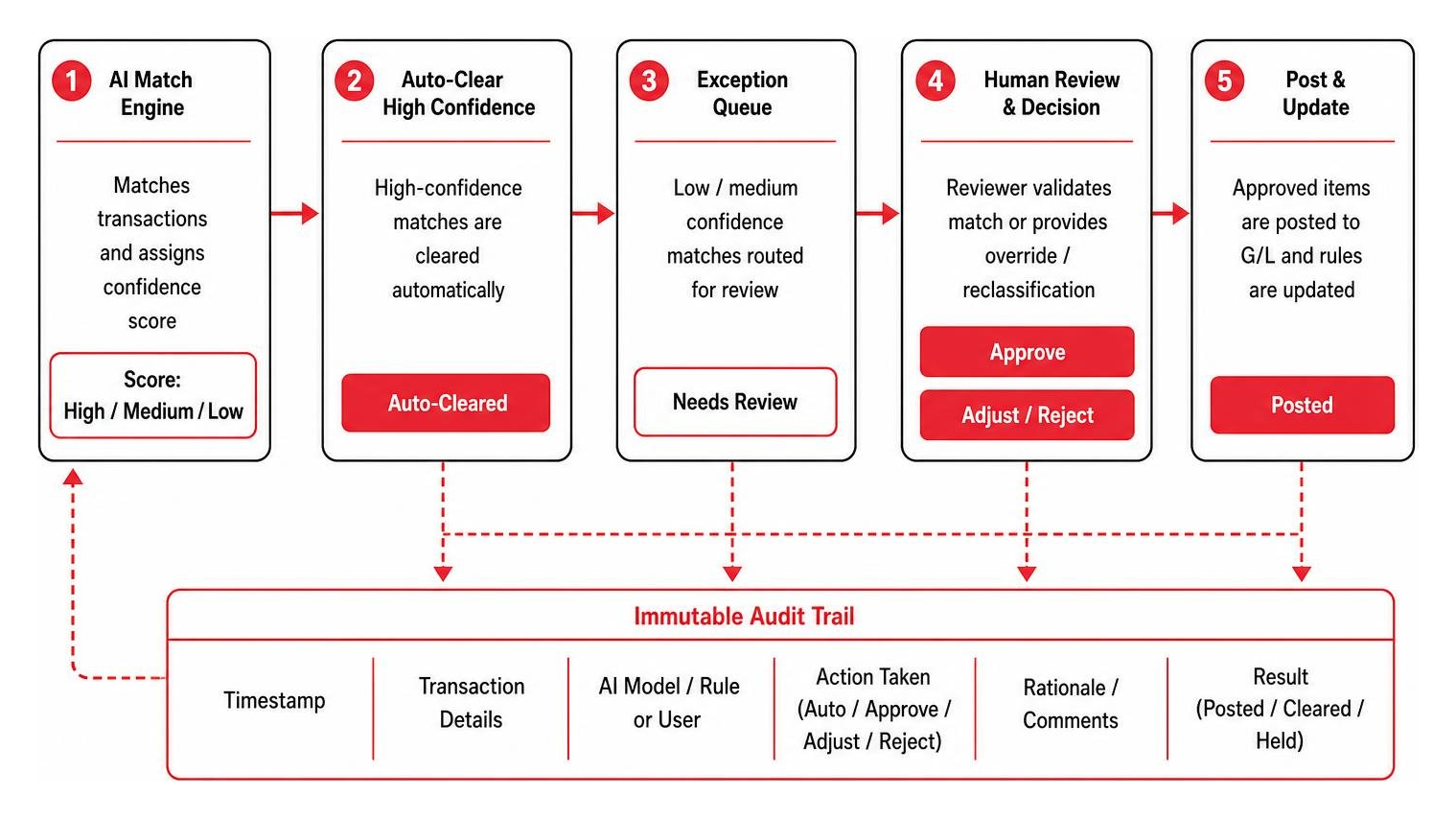
The system assigns a confidence score to every proposed match. High-confidence pairings (such as a 100% match on date, amount, and reference number) are cleared automatically. Low-confidence pairings are routed to an exception queue, where the system displays its reasoning to your accounting team for quick validation. To see how these matching rules are built and executed, read about AI Transaction Matching Software Automate Reconciliation ….
Step 4: Use AI Automated Bank Reconciliation to Post Unmatched Transactions to Suggested G/L Accounts
When transactions do not have a corresponding ledger entry—such as unexpected bank fees, interest payments, or point-of-sale utility purchases—the AI helps you resolve the difference. Instead of leaving these items in a suspense account, the system reads the transaction narrative and suggests the correct G/L account.
For instance, if a bank charge arrives with the description “Fuel Stop 24,” the AI identifies the context and suggests posting the amount to your “Transportation & Travel” G/L account. Once an accountant approves this recommendation, the system saves the mapping to your text-to-account rules, ensuring similar transactions auto-post in the future. To optimize this process for Texas-based businesses, consult the ultimate guide to AI accounting optimization in Texas.
Step 5: Establish Human-on-the-Loop Controls and Audit Trails
Automation does not mean eliminating human oversight. To maintain strict compliance with SOX and IFRS standards, you must implement a “Human-on-the-Loop” architecture. While the AI handles the bulk of the data processing, senior financial professionals must review exceptions and approve journal entries.
Every automated match, G/L suggestion, and manual override must be logged in an immutable, tamper-proof audit trail. This log captures the exact timestamp, the user or AI model responsible, and the matching rationale. This transparency ensures that your year-end audits are smooth and stress-free. For deeper insights into auditing automated systems, read the ultimate guide to machine learning financial auditing.
Evaluating Enterprise and Mid-Market AI Reconciliation Platforms
Selecting the right software depends on your transaction volume, ERP architecture, and treasury complexity. Different vendors approach automation with unique features and integration models.
- HighRadius: Focuses on “Agentic AI” for enterprise treasury teams. It specializes in processing millions of transactions across complex global bank panels, offering advanced cash forecasting and automated journal postings. Learn more about their approach in Understanding Agentic AI in Finance: Automating Bank ….
- Atlar: Designed for fast-growing companies requiring real-time treasury control. It offers deep bidirectional ERP integrations and consolidates traditional bank accounts and digital wallets into a single dashboard. Check out their platform at Atlar Intelligence.
- Nominal: Built for multi-entity enterprises managing complex intercompany reconciliations. It utilizes a “shadow G/L” structure to match transactions continuously without disrupting your primary ERP system of record. Read more at Bank Reconciliation: AI-Powered Automation – Nominal.
- Rever: Focuses on continuous verification and pattern-based anomaly detection. It uses bitemporal data storage to allow precise historical auditing of ledger adjustments. Explore their architecture at Rever: AI-Native Finance Automation Software.
- Nanonets: Specializes in document-centric AI, using Large Language Models (LLMs) to extract and match transaction data from unstructured sources like emails, PDFs, and vendor invoices.
Other notable platforms include MatchLedger — AI-Powered Bank Reconciliation, which provides secure, row-level isolated environments for CPAs, AI-Powered Account Reconciliation Software | Arvexi, which pre-investigates variances in seconds, Bank Reconciliation AI Agent for Finance Teams for custom workflows, Bank Reconciliation Software with AI Automation for tech startups, and Bank Reconciliation · Solutions — Donnerstag.ai for granular, line-item T+0 fee audits.
AI Reconciliation Platform Comparison
| Platform | Target Market | Key Strength | Integration Model |
|---|---|---|---|
| HighRadius | Enterprise | Agentic AI & cash forecasting | Deep ERP API |
| Atlar | Mid-Market to Enterprise | Real-time global liquidity | Bidirectional Sync |
| Nominal | Multi-Entity | Shadow G/L & intercompany | Native ERP Connectors |
| Rever | Enterprise | Bitemporal data & pattern auditing | Read-Only API |
| Nanonets | Mid-Market | Multi-format document ingestion | API & Webhooks |
Frequently Asked Questions About AI-Driven Reconciliation
How does AI handle complex, multi-invoice lump-sum payments?
AI platforms resolve many-to-one matching challenges by analyzing unstructured metadata. When a customer pays a single lump sum that covers three separate outstanding invoices, the AI analyzes the total payment amount, customer purchase history, and individual invoice balances. It then calculates the mathematical combinations to find the exact match and proposes the split allocation to the accountant for a single-click approval.
What are the operational limits of Copilot in Dynamics 365 Business Central?
Microsoft Dynamics 365 Business Central’s Copilot feature has specific data processing limits based on your software version. In the 2025 release wave 1 and earlier, the system is limited to analyzing approximately 1,000 open bank ledger entries per run. In the 2025 release wave 2 and later, this capacity expands to 3,000 entries. To use this feature, an administrator must activate the capability in the Copilot settings, and your data must be structured cleanly.
Is financial data secure when using AI-native reconciliation tools?
Yes, enterprise-grade AI reconciliation tools employ strict security measures to protect sensitive financial data. Leading platforms utilize AES-256 encryption at rest and TLS 1.3 in transit, and maintain SOC 2 Type II and ISO 27001 certifications. Furthermore, multi-tenant platforms use row-level database isolation to ensure your financial records remain completely segregated from other organizations.
Secure Your Financial Operations with Netsurit
Automating your bank reconciliation reduces month-end stress, eliminates manual typing errors, and provides your leadership team with real-time cash visibility. However, deploying these advanced AI tools requires a secure, stable, and well-configured IT foundation. If your network is unoptimized or your ERP integration is weak, your automation efforts will stall.
At Netsurit, we act as your elite technology partner. We provide managed IT, cybersecurity, and strategic AI solutions to keep your accounting systems connected, secure, and running without downtime. Whether your business operates in Houston, Sugar Land, Conroe, Katy, or beyond, we help you scale your operations and achieve your business aspirations.
Ready to modernize your financial infrastructure? Explore our specialized accounting firm IT services and schedule a consultation with our technology experts today.