Why Automated Payroll Tax Filing Is Now the Default — Not the Option
Automated payroll tax filing means your payroll software calculates, withholds, and submits federal, state, and local payroll taxes on your behalf — every time you run payroll — without manual intervention.
Here is what that covers in practice:
| What Gets Automated | Examples |
|---|---|
| Federal tax calculation | FICA, FUTA, income tax withholding |
| Federal form filing | Form 941 (quarterly), Form 940 (annual), Form 944 |
| State tax remittance | State income tax, State Unemployment Insurance (SUI) |
| Year-end forms | W-2s, 1099s |
| Deadline management | Deposit schedules, quarterly due dates |
This is not a niche feature anymore. As of July 1, 2026, QuickBooks Online Payroll removed the option to file manually — automation is now mandatory for all configured taxes. Other major platforms have operated this way for years. If you run payroll in Texas, California, or Kentucky, the rules around electronic filing and remittance are tightening every year.
The upside is real: fewer missed deadlines, less manual tracking, and a cleaner audit trail. But automation also shifts the risk. Errors in your setup do not pause — they replicate across every payroll run until someone catches them. For a CPA firm in the Houston metro area managing payroll for dozens of clients, that is a serious operational exposure.
This guide breaks down how the systems work, which providers do it best, and what to audit before you flip the switch.
I’m Orrin Klopper, CEO of Netsurit, a global IT services company that has spent over 30 years helping businesses secure and streamline their financial technology infrastructure — including the systems that power automated payroll tax filing. My team works directly with accounting firms and business leaders across North America who are navigating exactly this kind of mandatory compliance shift.
Common Automated payroll tax filing vocab:
- AI in payroll
- AI tax compliance
- Automated tax compliance software
Transitioning to Automated Payroll Tax Filing: Core Mechanics and Benefits
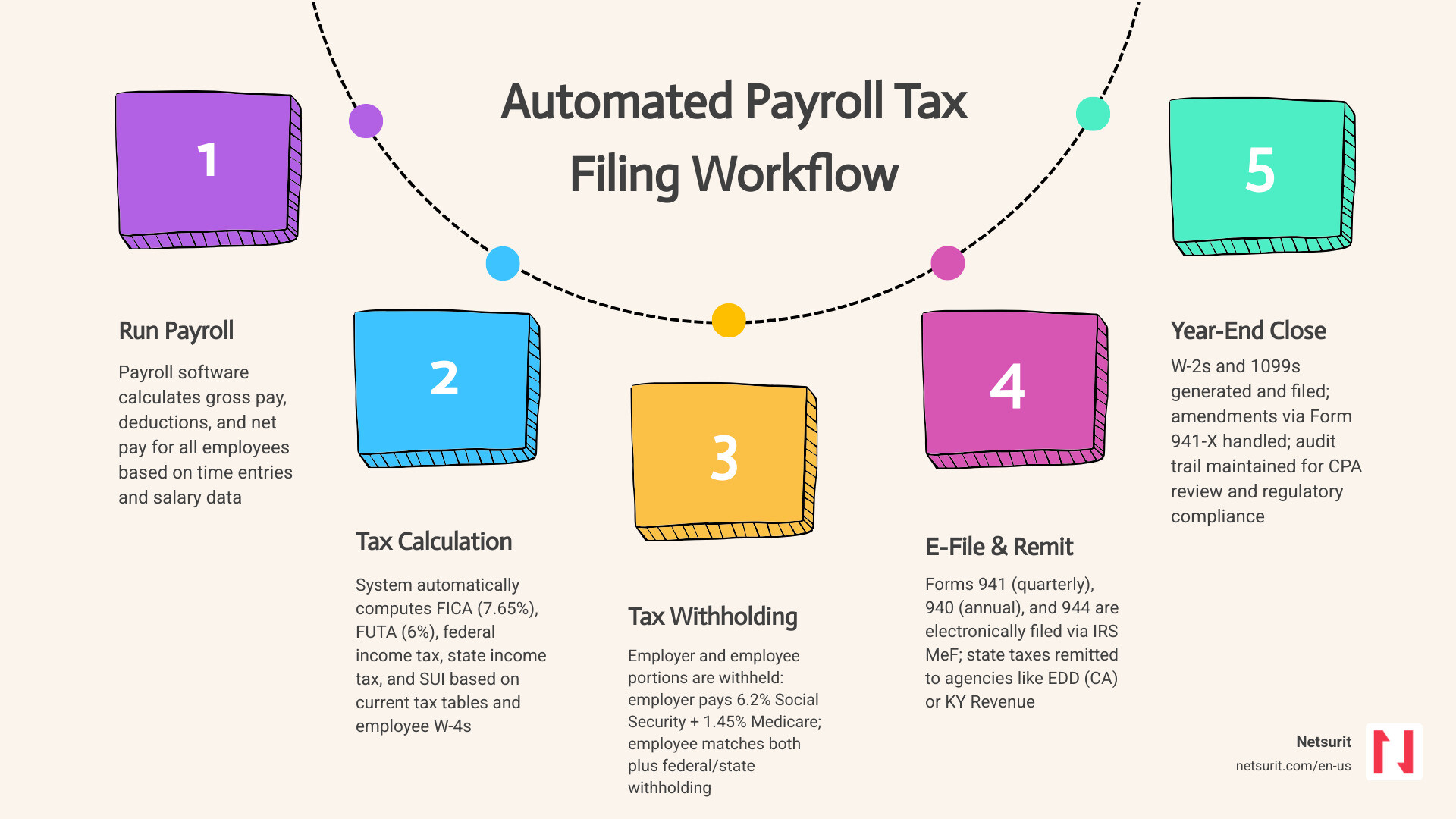
At its core, automated payroll tax filing replaces the manual checklist of tax deposits and form submissions with a direct, software-to-agency pipeline. Under a manual workflow, a payroll administrator runs payroll, calculates the employer and employee portions of FICA (6.2% Social Security and 1.45% Medicare) and FUTA, and then manually logs into the Electronic Federal Tax Payment System (EFTPS) to submit deposits. Later, they draft and submit Form 941 quarterly and Form 940 annually.
An automated system handles these steps concurrently. When you run payroll, the system calculates the exact liabilities, schedules the automatic withdrawal of those tax funds, and handles the electronic submission of required returns. For example, platforms like Gusto allow you to E-file Form 941 online without manual data entry. Knowing how to automate your tax compliance lets you shift administrative time to higher-value activities.
Real-World Scenario: Sugarland Payroll Processing
Consider a mid-sized engineering firm based in Sugarland, Texas. Under their legacy manual system, their payroll manager spent four hours every other Tuesday calculating withholdings, double-checking state unemployment insurance (SUI) adjustments, and scheduling tax payments. When they transitioned to an automated system, those four hours shrank to fifteen minutes of review. The system withdrew the FICA and FUTA obligations on payday and queued the quarterly filings automatically.
Trade-offs of Automated Payroll Tax Filing
While automation reduces manual touchpoints, it requires a clear understanding of its operational boundaries.
- Works best when: Your workforce has stable, standardized pay structures, consistent tax jurisdictions, and clean, pre-verified employee data.
- Avoid when: You have highly volatile, unverified contractor-to-employee classifications or frequently run off-cycle, non-taxable expense reimbursements that are poorly mapped in your system.
- Risks: Setup errors (like incorrect SUI rates or invalid employer identification numbers) will execute automatically, resulting in systemic miscalculations, duplicate tax withdrawals, or rejected filings.
- Mitigations: Establish a rigorous pre-flight audit checklist for every new tax year, lock down system access with multi-factor authentication (MFA), and verify local tax rates manually before running the first payroll of the year.
Comparing Top Providers for Automated Payroll Tax Filing
Choosing the right automated payroll tax software depends on your organization’s complexity, size, and existing ERP integrations. Below is a direct comparison of the leading platforms on the market in July 2026.
| Feature | Gusto | Paychex | QuickBooks Online Payroll |
|---|---|---|---|
| Target Business Size | Small to Mid-market (1–200 employees) | Mid-market to Enterprise (10–1000+ employees) | Small Business (1–100 employees) |
| Automation Scope | Full federal, state, and local tax automation | Full automation + tax credit integration | Full automation (Mandatory as of July 2026) |
| Multi-State Support | Automated registration and filing in all 50 states | Dedicated multi-state compliance teams | Supported; local taxes require Premium/Elite tiers |
| Verification Requirements | Standard principal officer verification | Comprehensive corporate compliance check | Mandatory principal officer SSN and bank link |
| Key Strength | Intuitive interface; 88% customer compliance rating | Robust scale; claims R&D and local tax credits | Deep integration with QuickBooks accounting suite |
Gusto has earned a strong reputation among small businesses, with an average 4.5/5-star customer rating across more than 500,000 businesses. Paychex operates at a larger scale, serving approximately 800,000 customers, and excels at handling complex seasonal filings and uncovering underutilized tax credits.
For larger enterprises running highly customized human resource ecosystems, specialized tools like ADP SmartCompliance® Employment Tax | ADP Marketplace bridge the gap between standard payroll runs and complex, multi-jurisdictional tax remittance. Similarly, organizations using comprehensive ERPs can integrate their human resource databases directly with third-party filing networks using tools like the Oracle Human Resources – Get Started developer framework.
Setting Up Automated Payroll Tax Filing in QuickBooks Workforce
Setting up automated filing within QuickBooks Workforce requires several strict identity and financial verification steps. Because the system will automatically withdraw funds and file legal documents on your behalf, the platform enforces these steps to prevent fraud and compliance failures.
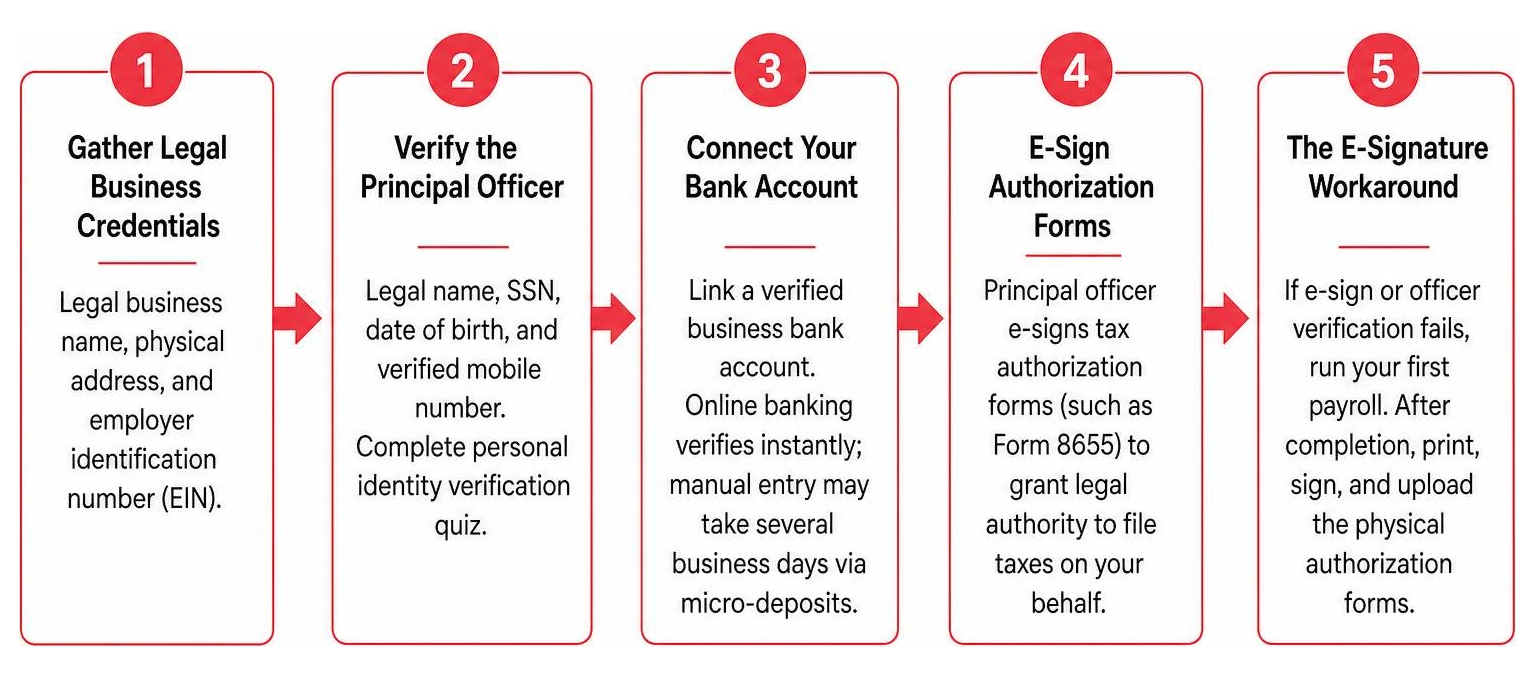
- Gather Legal Business Credentials: You need your legal business name, physical address, and employer identification number (EIN) as registered with the IRS.
- Verify the Principal Officer: The system requires the designated principal officer’s legal name, Social Security Number (SSN), date of birth, and a verified mobile number. This individual must complete a personal identity verification quiz during the setup.
- Connect Your Bank Account: You must link a verified business bank account. Connecting via online banking credentials provides instant verification, whereas manual routing and account number entry can take several business days to verify via micro-deposits.
- E-Sign Authorization Forms: The principal officer must e-sign the tax authorization forms (such as Form 8655) to grant QuickBooks the legal right to file taxes on your behalf.
- The E-Signature Workaround: If the electronic signature system fails or the principal officer cannot be verified online, you must run your first payroll. Once that first run is complete, the system unlocks a manual workaround, allowing you to print, sign, and upload the physical authorization forms.
Real-World Scenario: Conroe Tax Office Audit
A retail business near the Tax Services: Ste F, Conroe, Texas area recently upgraded their payroll tier to automate local tax filings. During setup, the owner’s e-signature failed because of a recent home address change that didn’t match public records. Rather than stalling their payroll cycle, they utilized the system workaround: they processed their first payroll, printed the physical authorization document, signed it manually, and uploaded it to the portal. This kept their tax filings compliant without interrupting their employees’ pay cycle.
Multi-State Compliance and Automated Payroll Tax Filing Challenges
Managing payroll across multiple states introduces significant compliance friction. Each state maintains its own registration rules, filing frequencies, and electronic transmission standards. For businesses in Texas, where there is no state personal income tax, payroll calculations are relatively straightforward. However, the moment you hire remote employees in other states, your payroll software must adapt to those local withholding and unemployment rules.
Using Payroll Services in Texas simplifies local processing, but multi-state expansion requires careful coordination. For example, if you hire a remote worker in Kentucky, you must register with their state tax agency and comply with Employer Payroll Withholding – Department of Revenue guidelines, which enforce a 3.5% withholding tax rate for 2026. If you hire in California, your payroll system must interface directly with the Federal/State Employment Taxes (FSET) program, which handles bulk electronic wage reporting and tax deposits.
Real-World Scenario: Katy Remote Workforce Expansion
A software development firm located near Tax Services: 5502 N Fry Rd, Katy, Texas expanded its team by hiring remote engineers in Maine and Tacoma, Washington.
To remain compliant, their automated payroll system had to be updated with unique state withholding IDs. For the Maine employee, the system routed filings through the electronic portal managed by Electronic Services | Maine Revenue Services. For the Tacoma employee, the system had to track Washington’s unique Paid Family and Medical Leave (PFML) withholdings and local business taxes, which are often audited near Tax Services: 7626 S Tacoma Way, Tacoma, Washington. Because the firm used a premium automated payroll tier, the software automatically detected these local jurisdictions and prompted the administrator to input the correct state-specific account numbers before the first multi-state pay run.
Managing the Risks and Hidden Pitfalls of Mandatory Automation
While automated payroll systems save time, they also remove manual checkpoints. If incorrect data enters an automated system, the software will process and file those errors without hesitation. This can result in several operational issues:
- Cash Flow Timing Disruptions: Many automated payroll platforms withdraw tax funds on the exact day you process payroll, even if those taxes are not legally due to the government for several weeks. For businesses running weekly payrolls, this can unnecessarily tie up working capital.
- Duplicate Withdrawals: If you manually pay a tax liability through a state portal and forget to mark that payment as “paid” within your automated payroll software, the system will execute its scheduled automated withdrawal, resulting in duplicate payments and a tedious refund process.
- Default Withholding Rates: If an employee’s Form W-4 is missing or incomplete in the system, automated platforms typically default to the highest single withholding rate. This can lead to over-withholding and frustrated employees.
- SUI Rate Mismatches: State Unemployment Insurance (SUI) rates change annually. If you fail to manually update your new SUI rate in your payroll settings, the automated system will continue filing based on the old rate, leading to automated underpayment notices and state-level penalties.
Understanding your guide to AI in tax and accounting helps you design internal controls to catch these automated errors before they escalate.
Real-World Scenario: Houston CPA Firm Workflow Disruption
A CPA firm in downtown Houston managed payroll for a local construction company. During a system migration, the client’s new SUI rate of 4.2% was not updated in the automated payroll settings, leaving the default rate at 2.7%. Over three months, the automated system filed and paid SUI taxes at the lower rate. The error was only discovered when the Texas Workforce Commission issued an automated penalty notice. The CPA firm had to manually file amended quarterly returns and pay the interest charges, a headache that could have been avoided with a simple pre-flight configuration audit.
Technical Integration: Modernized e-File (MeF) and ERP Systems
Automated payroll systems do not communicate with tax agencies through simple email attachments. Instead, they rely on structured data pathways. At the federal level, this is handled by the Modernized e-File (MeF) for employment taxes | Internal Revenue Service platform. MeF uses standardized XML schemas to transmit tax returns, providing near real-time receipt acknowledgments and pinpointing the exact location of any data errors within the transmission.
For companies using enterprise resource planning (ERP) systems, keeping your payroll databases aligned with tax structures is critical. If you are exploring the ultimate guide to AI-native accounting software, you know that modern ERP platforms can automate year-end reporting, such as the updated 1099 structures. For instance, Microsoft Business Central updated its 1099 structure, requiring businesses to utilize the IRS Information Returns Intake System (IRIS) for electronic uploads.
Real-World Scenario: Sugarland ERP Integration
A manufacturing business in Sugarland, Texas, integrated its Business Central ERP with an automated tax compliance platform. By updating their ERP database and securing an IRS IRIS transmitter code, they automated their year-end vendor 1099 filings. The system automatically checked vendor tax identification numbers (TINs), verified email delivery consents, and transmitted the files directly to the IRS via the MeF gateway, eliminating manual paper processing and reducing year-end administrative overhead.
Frequently Asked Questions About Automated Payroll Taxes
Can I still manually pay or file taxes if I use an automated system?
In most modern platforms, the answer is no. Major providers like QuickBooks Online Payroll have completely removed the option to manually file or disable automated tax payments for configured jurisdictions.
If you must pay a tax liability outside the system (for example, to resolve an outstanding historical audit), you must log into your payroll software’s tax center and manually mark that specific tax period as “paid.” Failing to record this external payment will cause the automated system to execute its scheduled withdrawal, resulting in duplicate tax payments and a lengthy refund process with the tax agency.
How do automated systems handle tax credits, amendments, and error corrections?
Automated systems calculate standard federal and state payroll taxes, but they do not automatically detect or apply specialized tax credits, such as the Research and Development (R&D) tax credit or location-based hiring incentives. To claim these savings, you must manually configure your payroll settings or work with your provider’s specialized tax compliance team to apply the credits to your tax liabilities.
When errors occur, automated systems cannot self-correct historical filings. If a past filing contains an error, you must file an amended return (such as Form 941-X). While some payroll platforms assist with generating amended forms, the correction process often requires manual preparation, electronic submission via MeF, or physical paper mailing to state agencies that do not support electronic amendments.
What happens if my payroll tax setup is incomplete or contains errors?
If your payroll tax setup is incomplete (such as a missing state withholding ID or unverified bank account), the system will flag the account with an administrative block. In many cases, these blocks will prevent you from running payroll entirely until the missing information is provided.
If the setup contains errors that bypass system validation (such as an incorrect SUI rate), the software will continue to file and pay based on the incorrect data. This will eventually trigger automated penalty notices from the IRS or state agency, default your employees to the highest single withholding rate, and require manual amended filings to resolve the discrepancies.
Conclusion: Securing Your Payroll Technology Stack
Automating your payroll tax filing saves time and reduces compliance risks, but its success depends on the accuracy of your setup and the security of your underlying technology. Because payroll systems hold highly sensitive corporate financial data, bank credentials, and employee Social Security Numbers, they are prime targets for cyber threats.
At Netsurit, we help accounting firms and businesses secure their financial applications, manage software integrations, and maintain strict compliance standards. As an elite technology partner operating in New York, New Jersey, Texas, and Seattle, we provide comprehensive accounting firm IT services to protect your data and keep your operations running smoothly.
Understanding what are managed IT services helps you build a secure, resilient IT infrastructure. We help our clients achieve SOC 2 Type 2 compliance, implement multi-factor authentication (MFA), and establish strict IT change freezes during peak tax seasons (January to April) to prevent system downtime.
Next Action: Review your payroll tax settings today, verify that your SUI rates match your state agency notices, and ensure your payroll platform is secured with multi-factor authentication.