Texas Businesses Break Without a Plan — Here’s How to Build One That Holds
Disaster recovery planning Texas is the process of preparing your business to survive and recover from events like hurricanes, floods, cyberattacks, and power outages — before they happen.
Here’s what every Texas business needs to know, fast:
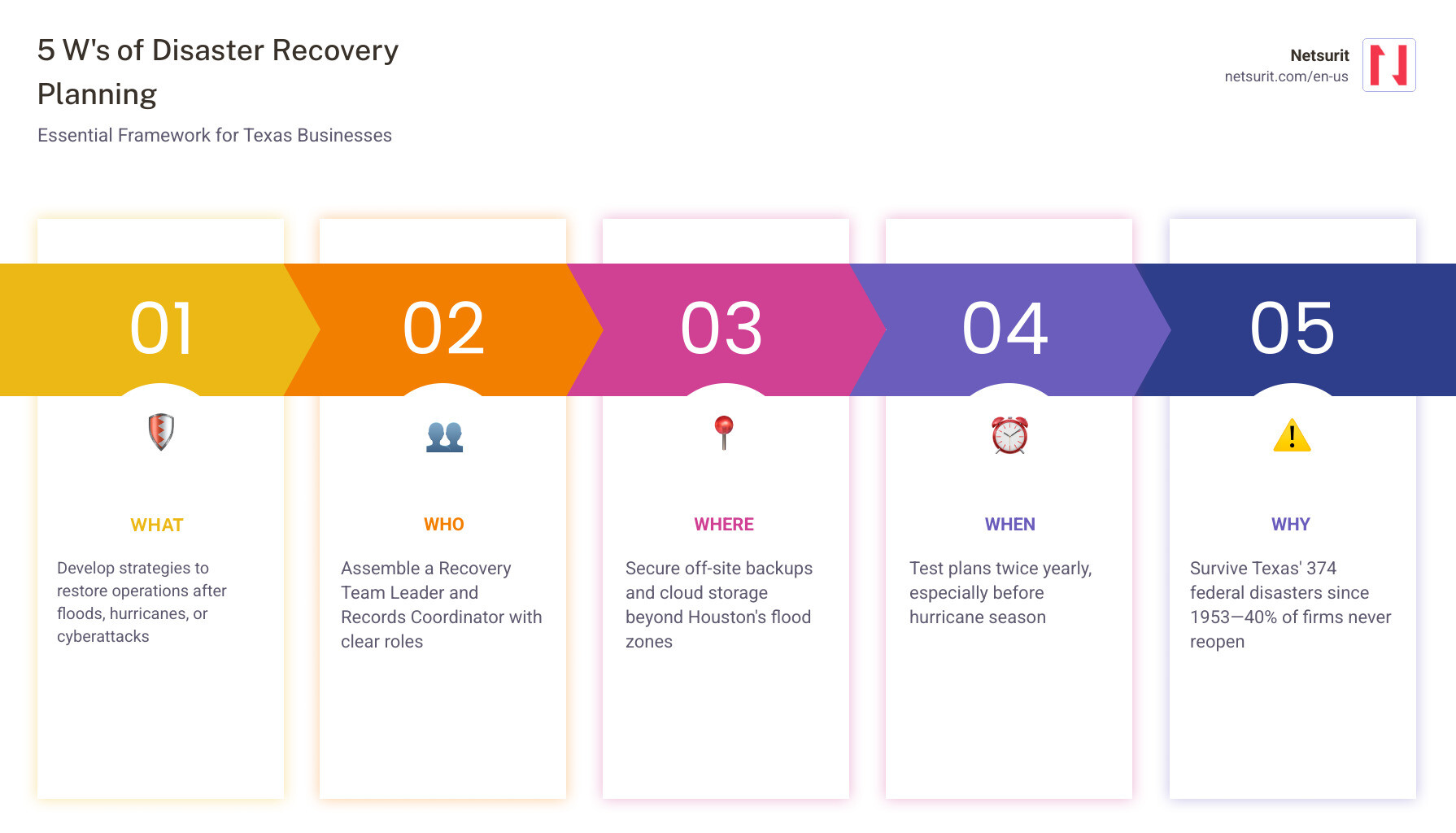
| Step | What to Do |
|---|---|
| 1. Assess your risks | Identify your 27+ Texas-specific hazards: floods, hurricanes, wildfires, winter storms |
| 2. Build your team | Assign a Recovery Team Leader, Records Coordinator, and alternates |
| 3. Define your objectives | Set your RTO (how fast you recover) and RPO (how much data you can afford to lose) |
| 4. Protect vital records | Back up critical files off-site and in the cloud with encryption |
| 5. Test your plan | Run drills at least twice a year — more if your business is growing |
| 6. Know your declarations | Understand when to request state or federal disaster assistance |
Texas leads the nation with 374 federal disaster declarations since 1953. That’s not a warning — it’s a pattern. For a business in Houston, Katy, or Conroe, the question isn’t whether a disaster will disrupt operations. It’s whether your firm will be one of the 40% that never reopens afterward.
A plan that sits in a drawer doesn’t protect you. It creates false confidence while your competitors who test their plans recover in hours instead of weeks.
The good news: building a real, tested disaster recovery plan is straightforward when you know the Texas-specific rules, the right team structure, and which tools actually hold up under pressure.
I’m Orrin Klopper, CEO and co-founder of Netsurit — a managed IT services company with offices in Texas that has spent nearly 30 years helping organizations build resilient IT infrastructure, including disaster recovery planning Texas businesses rely on when things go wrong. This guide draws on that experience to give you a practical, no-panic framework you can act on today.
Why Disaster Recovery Planning Texas is Non-Negotiable
Texas is the most disaster-prone state in the country. Since 1953, the state has weathered 374 federal disaster declarations. For a tax and accounting firm in the Houston metro area, the risk is not theoretical. Whether it is the 2024 severe storms that dropped 25 inches of rain on East Texas or the looming threat of Hurricane Beryl-style wind damage, your physical and digital assets are constantly in the crosshairs.
The Risk Landscape
The Texas Division of Emergency Management (TDEM) identifies 27 hazards of significant risk. For a Houston-based firm, a three-day power outage in mid-April 2025—the height of tax season—is a death sentence for client trust. If you cannot access client ledgers or file returns, the IRS does not offer “my server was underwater” as a standard excuse. You face missed deadlines, permanent client churn, and potential malpractice claims.
Economic Reality
Statistics show that 40% of businesses never reopen after a major disaster. In cities like Conroe or Sugar Land, localized flash flooding can be particularly devastating because it may not trigger a federal declaration immediately. If your “catastrophe” isn’t officially designated by the Texas Department of Insurance (TDI), you might face tighter claim-handling deadlines and less immediate state support.
So what? You must treat disaster recovery planning Texas as a core business function, not an IT “extra.” You need to watch the “Don’t Ignore Your Risk” campaign and realize that preparedness is the only differentiator between a temporary closure and total failure.
Trade-offs Box: Texas Recovery Strategies
| Feature | Works best when… | Avoid when… | Risks | Mitigations |
|---|---|---|---|---|
| On-Site Backups | Used for rapid, minor file restores. | Primary recovery method for floods/fires. | Hardware destruction; theft. | Use backup and disaster recovery with off-site sync. |
| Cloud DR | Distributed teams need 24/7 access. | Internet bandwidth is severely limited. | Data corruption; high egress costs. | Use cloud disaster recovery with end-to-end encryption. |
| Manual Recovery | Small firms with minimal data volume. | Scaling or during peak tax season. | Human error; slow recovery speed. | Automate failover scripts. |
Building Your Texas-Specific Recovery Team and Framework
A plan is only as good as the people executing it. In Texas, we distinguish between a Disaster (widespread destruction) and a Catastrophe (events causing irreparable information loss). Your team must be structured to prevent the former from becoming the latter.
Team Composition
For an accounting firm, your team shouldn’t just be “the IT guy.” It requires a structured hierarchy:
- Recovery Team Leader: Must have expenditure authority to buy emergency hardware or hire contractors without waiting for a board meeting.
- Records Coordinator: Responsible for identifying vital records and ensuring TSLAC (Texas State Library and Archives Commission) compliance.
- Executive Assistant: Manages logistics, such as temporary office space or hoteling for staff.
Communication Protocols
When the fiber lines are cut in Conroe, your office VOIP system is useless. Establish a “Joint Information System” using encrypted, mobile-first group chats. Ensure every team member has two physical copies of the plan: one at the office and one at home.
Disaster recovery planning Texas for Houston accounting firms
In the Houston metro, your plan must be built around two critical metrics:
- RTO (Recovery Time Objective): How long can you be down? For a firm in Katy during April, your RTO might be a mere 4 hours.
- RPO (Recovery Point Objective): How much data can you lose? If you back up once a day at midnight, and your server dies at 4 PM, you’ve lost 8 hours of high-value client entries.
Example: A Houston firm using it-consulting-houston services would set an RPO of 15 minutes, ensuring that even a total hardware failure only results in minimal data re-entry.
Protecting Vital Records: Legal Requirements and Salvage
Texas state agencies are bound by TSLAC requirements and Texas Labor Code §412.054 to protect vital records. While you may be a private firm, following these standards is the best way to ensure business continuity and meet professional liability insurance requirements.
Vital Records Protection
Vital records are those necessary to resume operations and protect the legal and financial rights of the firm and its clients. For tax professionals, this includes active client files, payroll, and corporate governance documents.
Salvage Procedures
In the humid Houston climate, mold can begin growing on water-damaged paper records within 48 hours. If a pipe bursts in your Conroe office or a roof leaks in Sugar Land, follow these salvage steps:
- Paper: Blast-freeze soaked records at -20°F to stabilize inks. This allows for professional vacuum freeze-drying later.
- Electronic Media: If hard drives or old magnetic tapes are submerged, rinse them with distilled water to remove silt. Never use a hairdryer or heat source to dry them; this warps the components and guarantees data loss.
- Stabilize the Environment: Use fans and dehumidifiers to drop the humidity below 50% immediately.
Example: If a Katy accounting firm loses physical records, they should document the destruction using an internal version of the RMD 102 Form. This provides an audit trail for the IRS and insurance carriers, proving the records weren’t “lost” due to negligence but destroyed by a documented disaster.
Maturing Your Strategy Through Automated Testing
Most Houston businesses suffer from “Backup Complacency.” They see a green checkmark on their backup software and assume they are safe. True disaster recovery planning Texas requires moving up the maturity ladder.
The Testing Ladder
- Stage 1 (Basic): Backup Verification. You know the files exist on a drive.
- Stage 2 (Structured): Scenario-based testing. You simulate a server failure.
- Stage 3 (Cross-Functional): You involve HR and Finance to see if they can actually work once the files are restored.
- Stage 4 (Automated): Continuous, automated failover. Your systems detect a failure and switch to the cloud without human intervention.
Automation and MTTR
By 2026, the standard for mid-sized Houston firms will be “Zero-Touch Recovery.” Automation reduces your Mean Time to Recovery (MTTR) by removing the “panic phase” where humans make mistakes. Using cybersecurity-services-in-houston ensures that if a ransomware attack hits, your system automatically rolls back to a clean state.
Disaster recovery planning Texas for remote workforces
With many staff members working from Katy or The Woodlands, your office isn’t the only point of failure.
- OneDrive for Business: Ensure all “individual” files are synced to the cloud.
- VPN Stability: Test your VPN’s ability to handle 100% of your staff simultaneously.
- VDI (Virtual Desktop Infrastructure): This allows staff to access a secure, high-performance desktop from any device, even if their work laptop is damaged.
Example: During a flood, a Conroe firm’s physical office might be inaccessible, but with a mature it-support-houston setup, employees can continue filing returns from their home kitchens using secure VDI.
Navigating State and Federal Assistance
When a disaster exceeds local capacity, the Texas Division of Emergency Management (TDEM) steps in. Understanding the bureaucracy is the only way to get reimbursed for your recovery costs.
The Declaration Process
- Local Declaration: A mayor or county judge declares a disaster. This lasts only seven days unless the local governing body extends it.
- Governor’s Declaration: Authorizes state resources and suspends statutes that might hinder response.
- Federal Declaration: The Governor requests this from the President via FEMA. This is what unlocks the big grants and SBA disaster loans.
Procurement Warning
A common mistake for Houston firms is “emergency spending” that violates federal rules. To remain eligible for FEMA or state reimbursement:
- Avoid “cost-plus-percentage-of-cost” contracts.
- Document the “rational basis” for every vendor chosen.
- Check the Top 10 Procurement Mistakes to avoid audits by the DHS Office of Inspector General.
So what? Keep an “Emergency Procurement Folder” in your DRP. If you hire a restoration company in the heat of the moment without a written contract or competitive bid, you may be footing the entire bill yourself.
Frequently Asked Questions about Texas DRP
What is the difference between a state of emergency and a disaster declaration?
In Texas, a “state of emergency” is often a general warning or a precursor to action. A Disaster Declaration is a specific legal tool under Government Code Chapter 418. It allows the Governor to suspend state laws, manage evacuations, and is the mandatory first step to requesting federal financial aid.
How often should a Houston business test its disaster recovery plan?
At a minimum, twice a year. However, if you are a growing firm in Sugar Land or Katy, you should conduct quarterly “Simulation/Walkthrough” tests. New employees bring new risks—like downloading unauthorized software—that can jeopardize your backup integrity.
Can the Texas Department of Insurance extend my claim deadlines?
Yes. Under Texas Insurance Code Section 542.059, the commissioner of insurance can extend claim-handling deadlines by an additional 15 days if a weather-related catastrophe or major natural disaster occurs. This gives insurers more time to process the surge of claims, but it also means you need to be proactive in following up on your business interruption filings.
Conclusion
Effective disaster recovery planning Texas requires moving beyond simple backups toward a culture of “Stage 4” testing maturity. For accounting and tax firms in Houston, Katy, Sugar Land, and Conroe, the immense scale of Texas weather risks makes a DIY approach dangerous.
Netsurit acts as an elite tech partner for Texas firms, providing the managed IT and cybersecurity solutions needed to crush downtime. We ensure your business momentum remains uncrushed, whether the threat is a Category 5 hurricane or a sophisticated ransomware attack.
More info about managed IT services