
Manual Receipt Management Is Costing Your Business More Than You Think
AI automated receipt scanning solves one of the most persistent administrative headaches in business finance: the manual processing of paper and digital receipts.
Here’s a quick answer to what it does and who it’s for:
- What it is: Software that uses AI and OCR (Optical Character Recognition) to extract data — vendor name, date, total, tax, line items — from receipts automatically
- Who it’s for: Small business owners, freelancers, accountants, and finance teams who process receipts regularly
- What it replaces: Manual data entry, spreadsheet logging, and the infamous “shoebox” of crumpled paper receipts
- Key benefit: Cuts hours of manual work per week, reduces data entry errors, and keeps you audit-ready year-round
- Top tools in 2026: SparkReceipt, ReceiptPanda, Snyp.ai, Receipt AI, and Veryfi
Consider what this looks like in practice. A Houston-area accounting firm — say, a CPA practice in Katy, TX managing books for 30+ small business clients — receives hundreds of receipts each month via email, photo, and paper drop-off. Without automation, staff manually key in every vendor name, date, and amount. One wrong digit can throw off a VAT return or trigger an IRS discrepancy. That’s not a hypothetical risk — it’s a daily operational cost.
The numbers back this up. According to Snyp.ai, 46% of small businesses still process receipts manually as of 2026. That’s time that doesn’t scale, and errors that compound at tax time.
AI receipt scanning changes the equation. Modern tools process a receipt in 2–3 seconds with accuracy rates above 99%, pulling structured data from blurry photos, faded thermal paper, and even handwritten notes — then pushing that data directly into QuickBooks, Xero, or Zoho Books without manual intervention.
This guide compares the leading tools available in 2026, breaks down how the technology works, and helps you choose the right solution for your business or firm.
I’m Orrin Klopper, CEO and co-founder of Netsurit — a global IT services company that has spent over 30 years helping businesses eliminate operational bottlenecks through smart technology, including AI automated receipt scanning and broader financial workflow automation. In this guide, I’ll walk you through how these tools actually work, what separates the best from the rest, and what to watch for before you commit.
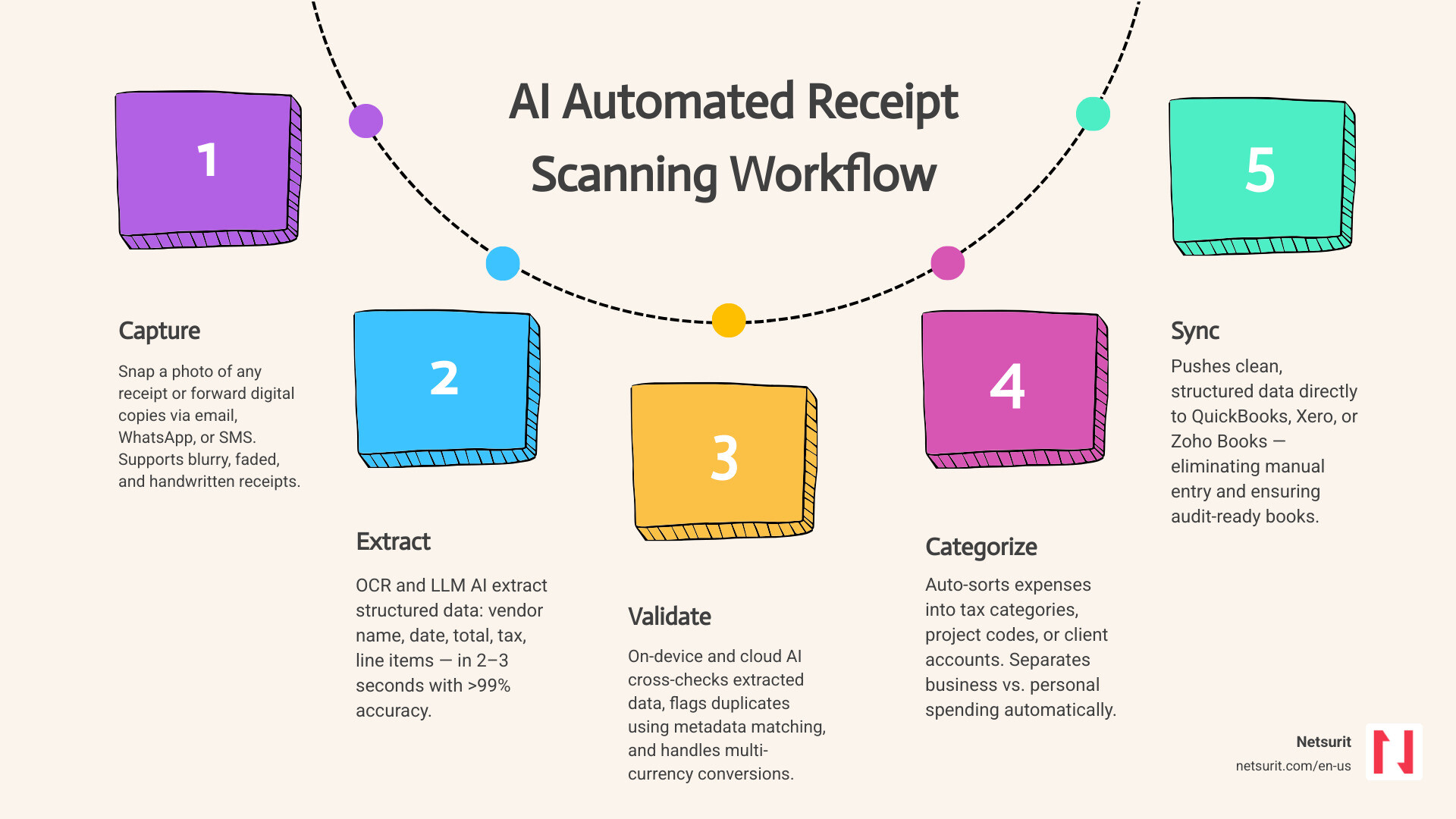
Simple guide to AI automated receipt scanning:
How AI Automated Receipt Scanning Works and Extracts Data
To understand how modern AI automated receipt scanning functions, you must look past traditional Optical Character Recognition (OCR). Legacy OCR tools simply convert an image of text into machine-readable text. They do not understand what they are reading. If a receipt lists a date at the top and another at the bottom, traditional OCR cannot reliably determine which one represents the transaction date.
Modern platforms combine OCR with Large Language Models (LLMs) and context-aware processing. The OCR engine digitizes the characters, and the LLM acts as an intelligent parser. It reads the entire document, understands the relationships between words, and extracts key values into structured JSON data.
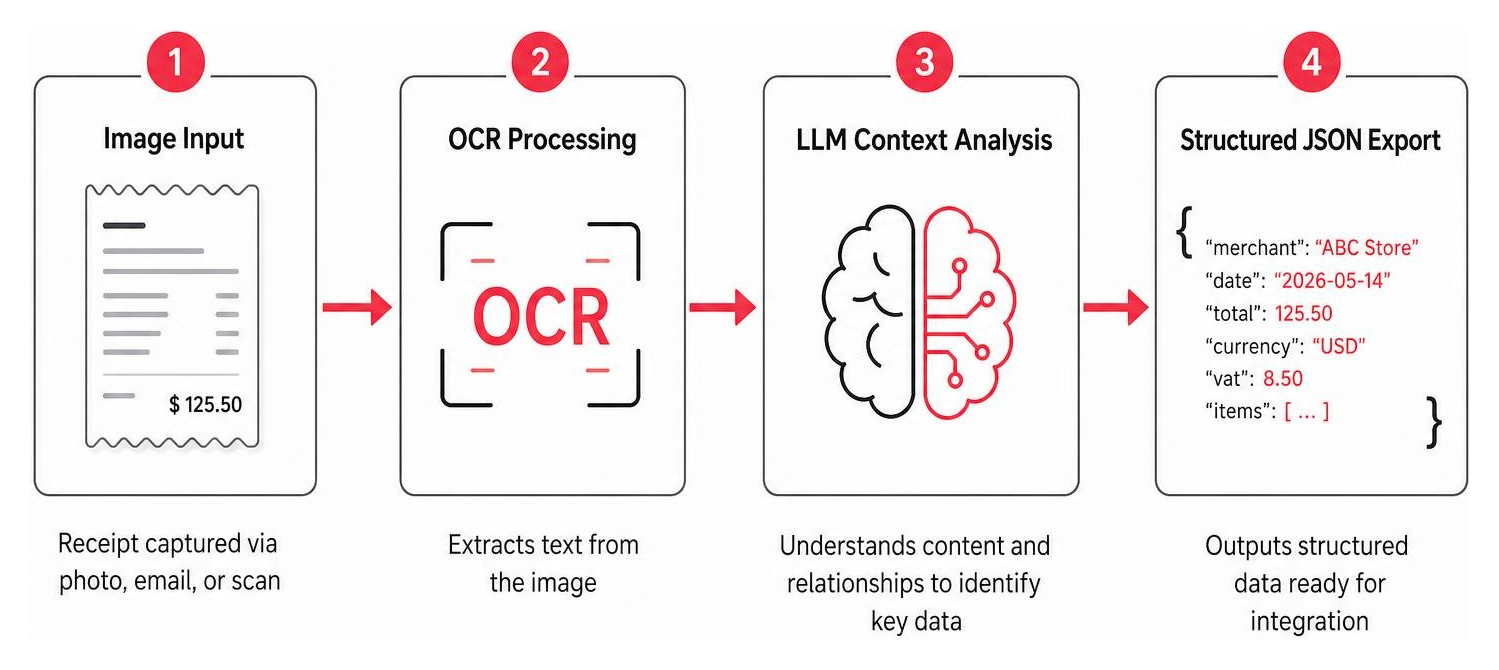
This hybrid approach allows the software to identify the merchant name, individual line items, transaction dates, and VAT breakdowns regardless of the receipt’s layout. For a detailed breakdown of how LLMs parse unstructured financial documents, you can explore the technical features of AI Receipt Data Extraction – Snyp.ai Receipt Scanner | Snyp.ai .
Core Technologies Behind AI Automated Receipt Scanning
The transition from rigid template-based extraction to adaptive AI relies on three core technologies:
- Context-Aware Processing: The AI does not look for a specific pixel coordinate to find the total. Instead, it searches for semantic clues like “Balance Due,” “Net Amount,” or “Total USD” to locate the correct financial figures.
- Machine Learning Models: These systems learn from historical corrections. If you manually correct a misclassified software subscription, the machine learning model adjusts its rules for that specific vendor in the future.
- On-Device Validation: Advanced mobile applications use edge-computing models to validate image quality before uploading. If a user takes a photo that is too dark or out of focus, the app flags the error instantly, ensuring only high-quality data enters the pipeline.
To understand how these technologies fit into a broader corporate expense strategy, read our insights on Spend Smart Not Hard: AI for Effortless Expense Tracking.
Handling Imperfect Documents: Blurry, Faded, and Handwritten Receipts
Physical receipts face harsh real-world conditions. Thermal paper degrades quickly when exposed to heat, friction, or light, leaving behind faded, barely legible text.
To combat this, modern scanning tools employ advanced image-enhancement algorithms. When a user uploads a photo, the software automatically adjusts contrast, sharpens edges, and corrects perspective distortions.
Handwriting recognition has also taken a massive leap forward. While legacy systems failed entirely on handwritten tips or custom invoices, current LLM-driven models analyze the context of surrounding numbers to deduce handwritten notes with high accuracy.
For example, on a construction site in Sugar Land, TX, a project manager might snap a photo of a faded concrete delivery receipt on a truck dashboard. Despite the bright Texas sun causing glare and the delivery driver having scribbled a custom surcharge by hand, the AI-powered scanner enhances the image, isolates the handwriting, and logs the correct total. You can see how this works in real-time by checking out AI Expense Tracker — Auto-Scan & Categorize Every Receipt .
Key Benefits and Workflows for Houston Accounting Firms
For CPA firms and businesses operating in the Houston metro area, implementing an automated workflow is about survival and scalability. Managing physical paperwork limits how many clients a single bookkeeper can support.
Consider a CPA firm in Katy, TX that manages books for local medical practices and retail stores. By shifting to an automated receipt pipeline, the firm eliminates manual data entry entirely. Clients no longer drop off physical folders at the end of the month. Instead, they submit receipts in real-time via text or email, allowing the firm to maintain daily ledger accuracy and offer proactive tax planning. For a deeper look at regional accounting tech trends, see The Ultimate Guide to AI Accounting Optimization in Texas.
Trade-offs of AI Automated Receipt Scanning
Before deploying an AI scanning solution across your organization, weigh the operational trade-offs:
| Parameter | Details |
|---|---|
| Works best when… | Receipts are captured immediately, digital invoices are forwarded automatically, and the tool is integrated directly with your primary ledger. |
| Avoid when… | You rely on complex, non-standard custom inventory codes that require highly subjective human judgment to categorize. |
| Risks | Over-reliance on automation can lead to uncaught classification errors if the AI misinterprets a highly unusual transaction. |
| Mitigations | Establish a “human-in-the-loop” review step for transactions exceeding a specific dollar threshold before syncing to your ledger. |
Streamlining Tax Preparation and Expense Reporting
Tax preparation is traditionally a reactive, stressful process. Businesses often lose thousands of dollars in legitimate tax deductions simply because thermal paper receipts faded in a drawer or got lost in an employee’s vehicle.
AI receipt scanners eliminate this risk by digitizing and storing tax-compliant images of every transaction. Under IRS guidelines, digital receipts are fully acceptable substitutes for physical paper, provided they are legible and systematically organized.
For instance, a real estate investor in Conroe, TX managing multiple rental properties can scan maintenance bills on-site. The AI automatically tags each receipt to the correct property subaccount, making it simple to generate clean, audit-ready expense reports for their accountant at year-end. This shift dramatically reduces the time spent on manual reconciliations, as explored in The Accountant’s New Best Friend: Unpacking AI’s Impact.
Multi-Currency, Multi-Language, and Expense Separation
As businesses expand, they frequently encounter transactions across different currencies and languages. Leading AI scanners support dozens of languages and can process over 150 currencies, automatically converting foreign transactions using live foreign exchange (FX) rates.
Additionally, these tools solve the challenge of co-mingled funds. Freelancers and small business owners often struggle to keep business and personal expenses separate. Modern scanning platforms address this by allowing users to create distinct workspaces or subaccounts. When a receipt is scanned, the user simply assigns it to the “Business” or “Personal” workspace, keeping the primary ledger clean. To learn more about how this simplifies back-office operations, read Bye Bye Manual Entries: Hello AI Bookkeeping.
Comparison of Leading AI Receipt Scanning Tools in 2026
Choosing the right tool depends on your specific ingestion preferences, team size, and integration requirements. Below is a comparison of the top platforms in 2026.
| Tool | Primary Ingestion Channel | Key Strength | Target Audience |
|---|---|---|---|
| SparkReceipt | Email auto-fetch, Mobile App | Bank statement matching | Small businesses & freelancers |
| ReceiptPanda | Web upload, Email, Mobile | Line-item project tracking | Project-based SMBs & teams |
| Snyp.ai | WhatsApp, Email | Frictionless chat-based upload | Freelancers & micro-businesses |
| Receipt AI | SMS, Email | No-app messaging workflow | Mobile teams & field workers |
| Veryfi | API, Mobile SDK | Enterprise security & compliance | Developers & corporate finance |
To explore how these tools fit into a broader small business stack, see AI Receipt Scanner for Small Business | SparkReceipt .
SparkReceipt: High-Accuracy Email and Bank Statement Matching
SparkReceipt focuses heavily on automated digital workflows. Rather than requiring users to manually upload every document, it connects directly to email providers like Gmail and Outlook via secure APIs. The software runs in the background, automatically fetching, parsing, and categorizing incoming digital invoices.
With a high accuracy rate across millions of processed documents, it also features advanced bank statement reconciliation. Users can upload bank statements in PDF or CSV formats, and the AI automatically matches statement line items against captured receipts to identify missing deductions or duplicate entries. To learn more about setting up automated matching rules, see No More Manual Matching: A Guide to Automated Reconciliation.
ReceiptPanda: LLM-Powered Line-Item Extraction and Project Tracking
ReceiptPanda stands out for its granular line-item extraction. While basic scanners only capture the receipt total, ReceiptPanda uses a hybrid OCR and LLM stack to break down every single item, tax rate, and quantity listed.
This makes it highly effective for project-based businesses. Users can assign specific line items to different client accounts or project codes. For example, a marketing agency can split a single office supply receipt across three different client budgets, maintaining live project margins and streamlining team approval workflows. For more details on team approval rules, check out ReceiptPanda – AI Receipt Scanning and Expense Reports .
Snyp.ai: Frictionless WhatsApp and Email Forwarding
Snyp.ai focuses on reducing user friction during the ingestion phase. Recognizing that many employees dislike downloading and navigating dedicated expense apps, Snyp.ai integrates directly with WhatsApp.
Users simply snap a photo of a receipt and send it to a dedicated Snyp.ai WhatsApp contact. The AI processes the image in seconds, extracts the structured data, and automatically queues it for review. This conversational approach is paired with a flat-rate monthly subscription model, making it highly accessible for teams that want a “set-and-forget” workflow. You can explore their platform at Snyp.ai – Smart Receipt Scanning for Xero & QuickBooks .
Receipt AI: SMS-Based Capture for QuickBooks and Xero
Receipt AI takes a similar, highly accessible approach by leveraging SMS text messaging. This completely bypasses the need for smartphone apps, which can be buggy or difficult to use on the road.
To log an expense, users text a photo of their receipt to a designated number. The system processes the image, extracts the data, and allows users to append custom memos by typing them directly into the text message. It also features built-in duplicate detection to prevent double entries in QuickBooks and Xero, saving finance teams valuable time. Learn more about their direct sync features at Receipt AI | Sync Receipts & Line Items to QuickBooks Online .
Veryfi: Developer-First OCR APIs and Enterprise Security
Veryfi is built for organizations that need to embed document extraction directly into their own software products or require enterprise-grade security compliance. It is a developer-first platform offering robust RESTful APIs and mobile SDKs.
Veryfi features a processing time of under three seconds and operates with high accuracy. Crucially, it is SOC 2 Type II certified and compliant with strict global standards, including GDPR, HIPAA, and CCPA. This level of compliance makes it the preferred choice for healthcare organizations, financial institutions, and large enterprises. You can test their developer tools at Veryfi: OCR APIs for Invoices, Receipts, Checks (Recommended) .
Security, Compliance, and Integration Best Practices
When dealing with financial data, security cannot be an afterthought. Uploading sensitive corporate receipts or bank statements to unverified cloud platforms exposes your business to significant data privacy risks.
To protect your organization, ensure that any tool you adopt uses bank-grade AES-256 encryption for data at rest and SSL/TLS encryption for data in transit. You should also verify where your data is stored and what retention policies are in place. For a broader look at securing your business’s AI tools, check out our guide on AI Productivity.
Protecting Financial Data with SOC 2 and GDPR Compliance
If your business operates in highly regulated sectors or handles international transactions, search for platforms that boast official compliance certifications.
- SOC 2 Type II: This certification proves that a third-party auditor has verified the tool’s security, availability, and processing integrity.
- GDPR Compliance: Essential if you handle data belonging to EU citizens, requiring strict data deletion capabilities and secure storage in compliant data centers.
- Local-First Storage: For maximum privacy, some mobile apps offer local-first storage, processing and storing your receipts directly on your device rather than uploading them to a shared cloud server.
Implementing these secure workflows is a critical step in modern risk management, as outlined in AI to the Rescue: Fixing Your Business Problems with Smart Tech.
Integrating AI Automated Receipt Scanning with Accounting Software
An AI scanner is only as useful as its integration with your primary ledger. To prevent double entry, your scanning tool must connect directly with QuickBooks Online, Xero, or Zoho Books.
When setting up the integration, follow these best practices:
- Map Your Chart of Accounts: Ensure the AI tool’s expense categories align perfectly with your existing ledger categories to prevent formatting errors.
- Configure Auto-Sync Wisely: For high-volume businesses, set up a review queue where transactions must be approved by a human before syncing to the live ledger.
- Reconcile Weekly: Use your automated receipt data to perform weekly bank reconciliations, keeping your financial forecasting models accurate and up to date.
For more tips on optimizing your financial stack with smart integrations, read How to Use AI for Financial Forecasting Without Losing Your Mind.
Frequently Asked Questions about AI Receipt Scanning
Can AI receipt scanners accurately process handwritten receipts?
Yes. Modern AI scanners powered by LLMs can process handwritten text with high accuracy. Because the AI analyzes the context of the entire document rather than just reading individual characters, it can accurately deduce handwritten totals, tips, and vendor names that legacy OCR tools would miss.
How do these tools prevent duplicate receipt entries?
Leading platforms use advanced duplicate detection algorithms. When a receipt is uploaded, the AI compares its metadata — including the vendor name, transaction date, and exact total — against existing entries in your ledger. If a match is found, the system flags the document as a duplicate and prevents it from syncing to your accounting software.
Is my financial data safe with cloud-based AI scanners?
Your data is safe provided you choose a tool that utilizes bank-grade encryption (AES-256) and meets recognized security standards such as SOC 2 Type II or GDPR. For businesses with extreme privacy requirements, look for apps that offer local-first, on-device storage options.
Conclusion
Transitioning to AI automated receipt scanning is a highly effective way to eliminate manual administrative bottlenecks, reduce accounting errors, and protect your business from missed tax deductions. Whether you choose the seamless email integration of SparkReceipt, the detailed project tracking of ReceiptPanda, or the developer-first security of Veryfi, the return on investment in saved hours and improved accuracy is immediate.
At Netsurit, we act as an elite technology partner for professional services and accounting firms across New York, New Jersey, Texas, and Washington. We help you design, secure, and manage modern AI workflows so you can focus on scaling your business.
Ready to modernize your firm’s technology infrastructure and secure your financial data? Discover how we support regional practices with tailored Netsurit Accounting Firm IT Services.